> ## Documentation Index
> Fetch the complete documentation index at: https://docs.blockradar.co/llms.txt
> Use this file to discover all available pages before exploring further.
# Create Addresses
> Generate dedicated deposit addresses for your users and track balances in real time.
In a nutshell
Dedicated addresses allow you to create unique blockchain addresses for each customer. These addresses can receive stablecoins across multiple EVM-compatible chains, with deposits automatically swept to your master wallet.
 ## Prerequisites
Before generating addresses, ensure you have:
Get your API key from the [Blockradar Dashboard](https://dashboard.blockradar.co). Navigate to **Developers** to generate one.
Create at least one master wallet via the [Create Wallet API](/en/about-the-api/master-wallet) or dashboard. You'll need the `walletId` to generate addresses.
Fund your master wallet with native tokens (ETH, BNB, MATIC, etc.) to cover gas fees for auto-sweeping operations.
Set up your webhook URL on the master wallet to receive deposit notifications. See [Webhooks](/en/utilities/webhooks) for setup details.
## How It Works
Dedicated Addresses is a crucial feature on Blockradar that enables you to create unique addresses for your customers. These addresses allow your customers to deposit stablecoins into your fintech app seamlessly.
When you create a dedicated address for a customer, they can use that single address to deposit stablecoins across multiple EVM-compatible blockchains.
For example, if you have Ethereum, Binance Smart Chain, Polygon, and Base master wallets created, each address you generate through any of these master wallets can be used to receive stablecoins on any of the [supported blockchains and assets](/en/use-cases/integrations). This ensures that you don't have to worry about your customer sending stablecoins to the wrong blockchain.
Additionally, when stablecoins are deposited into a particular address, the assets are automatically moved to the chain's master wallet address.
Aside from Tron and Solana, addresses generated from one wallet can be used to deposit stablecoins across other blockchains that have the blockchain parameter `isEvmCompatible: true`.
## Create a Dedicated Address
You can generate a dedicated address for your customer using either the [Blockradar dashboard ](https://dashboard.blockradar.co) or the API, depending on your workflow and integration needs.
### 1. Using the Dashboard
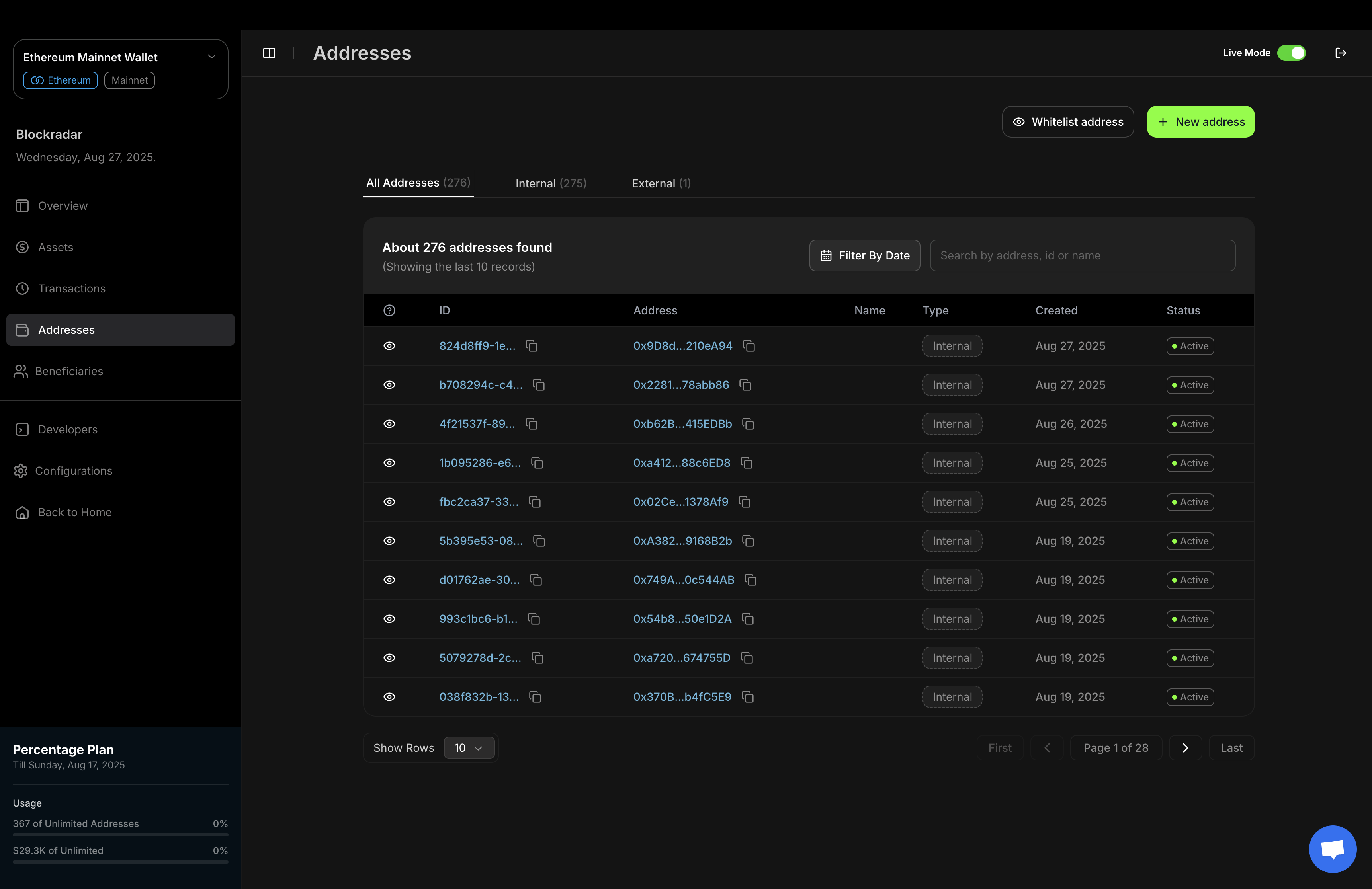
The Blockradar dashboard provides a simple, user-friendly interface for generating new addresses.
## Prerequisites
Before generating addresses, ensure you have:
Get your API key from the [Blockradar Dashboard](https://dashboard.blockradar.co). Navigate to **Developers** to generate one.
Create at least one master wallet via the [Create Wallet API](/en/about-the-api/master-wallet) or dashboard. You'll need the `walletId` to generate addresses.
Fund your master wallet with native tokens (ETH, BNB, MATIC, etc.) to cover gas fees for auto-sweeping operations.
Set up your webhook URL on the master wallet to receive deposit notifications. See [Webhooks](/en/utilities/webhooks) for setup details.
## How It Works
Dedicated Addresses is a crucial feature on Blockradar that enables you to create unique addresses for your customers. These addresses allow your customers to deposit stablecoins into your fintech app seamlessly.
When you create a dedicated address for a customer, they can use that single address to deposit stablecoins across multiple EVM-compatible blockchains.
For example, if you have Ethereum, Binance Smart Chain, Polygon, and Base master wallets created, each address you generate through any of these master wallets can be used to receive stablecoins on any of the [supported blockchains and assets](/en/use-cases/integrations). This ensures that you don't have to worry about your customer sending stablecoins to the wrong blockchain.
Additionally, when stablecoins are deposited into a particular address, the assets are automatically moved to the chain's master wallet address.
Aside from Tron and Solana, addresses generated from one wallet can be used to deposit stablecoins across other blockchains that have the blockchain parameter `isEvmCompatible: true`.
## Create a Dedicated Address
You can generate a dedicated address for your customer using either the [Blockradar dashboard ](https://dashboard.blockradar.co) or the API, depending on your workflow and integration needs.
### 1. Using the Dashboard
The Blockradar dashboard provides a simple, user-friendly interface for generating new addresses.
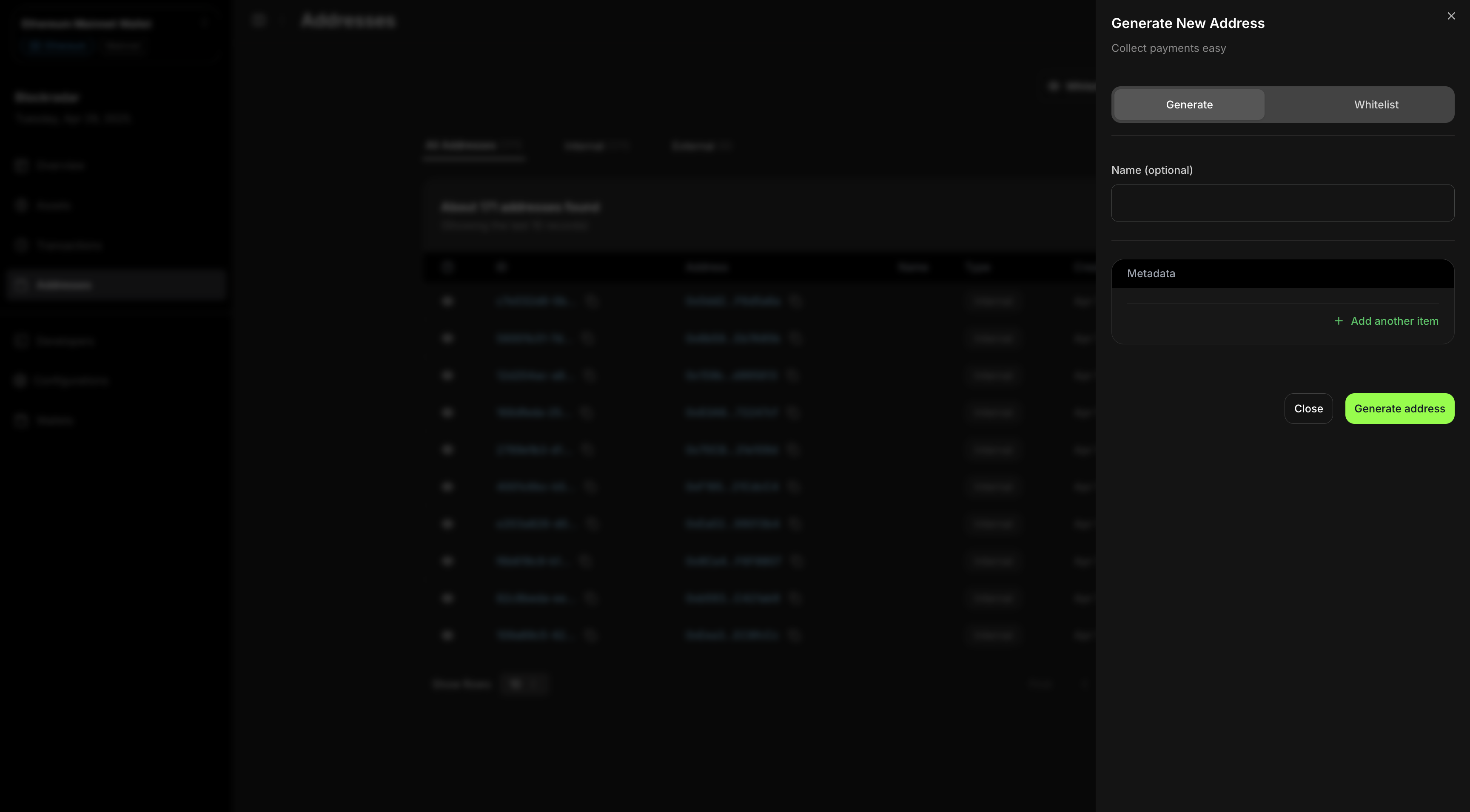 This screenshot demonstrates the process of generating a new address via the Blockradar dashboard. This method is ideal for manual address creation or for teams who prefer a graphical interface.
### 2. Using the API
For programmatic or automated address generation, you can use the **Create Dedicated Address API**.\
This is useful for integrating address creation into your own applications or backend systems.
To create a dedicated address for a customer, send a **`POST`** request to our [Create Dedicated Address API](/en/api-reference/addresses/generate-address).
```bash address.cmd theme={null}
curl --request POST \
--url https://api.blockradar.co/v1/wallets/{walletId}/addresses \
--header 'Content-Type: application/json' \
--header 'x-api-key: ' \
--data '{
"disableAutoSweep": "OPTIONAL_BOOLEAN",
"enableGaslessWithdraw": "OPTIONAL_BOOLEAN",
"metadata": "OPTIONAL_METADATA",
"name": "OPTIONAL_ADDRESS_NAME",
"showPrivateKey": "OPTIONAL_BOOLEAN"
}'
```
```js address.js theme={null}
const options = {
method: 'POST',
headers: {'x-api-key': '', 'Content-Type': 'application/json'},
body: '{"metadata":"OPTIONAL_METADATA","name":"OPTIONAL_ADDRESS_NAME"}'
};
fetch('https://api.blockradar.co/v1/wallets/{walletId}/addresses', options)
.then(response => response.json())
.then(response => console.log(response))
.catch(err => console.error(err));
```
```php address.php theme={null}
"https://api.blockradar.co/v1/wallets/{walletId}/addresses",
CURLOPT_RETURNTRANSFER => true,
CURLOPT_ENCODING => "",
CURLOPT_MAXREDIRS => 10,
CURLOPT_TIMEOUT => 30,
CURLOPT_HTTP_VERSION => CURL_HTTP_VERSION_1_1,
CURLOPT_CUSTOMREQUEST => "POST",
CURLOPT_POSTFIELDS => "{\n \"metadata\": \"OPTIONAL_METADATA\",\n \"name\": \"OPTIONAL_ADDRESS_NAME\"\n}",
CURLOPT_HTTPHEADER => [
"Content-Type: application/json",
"x-api-key: "
],
]);
$response = curl_exec($curl);
$err = curl_error($curl);
curl_close($curl);
if ($err) {
echo "cURL Error #:" . $err;
} else {
echo $response;
}
```
### Response
```json theme={null}
{
"data": {
"address": "0xe1037B45b48390285e5067424053fa35c478296b",
"blockchain": {
"createdAt": "2024-05-14T11:53:33.095Z",
"derivationPath": "m/44'/60'/0'/0",
"id": "85ffc132-3972-4c9e-99a5-5cf0ccb688bf",
"isActive": true,
"isEvmCompatible": true,
"logoUrl": "https://res.cloudinary.com/blockradar/image/upload/v1716800081/crypto-assets/ethereum-eth-logo_idraq2.png",
"name": "ethereum",
"slug": "ethereum",
"symbol": "eth",
"tokenStandard": "ERC20",
"updatedAt": "2024-06-14T22:32:11.983Z"
},
"configurations": {
"aml": {
"message": "Address is not sanctioned",
"provider": "ofac",
"status": "success"
},
"disableAutoSweep": false,
"enableGaslessWithdraw": false,
"showPrivateKey": false
},
"createdAt": "2024-10-23T11:13:40.446Z",
"derivationPath": "m/44'/60'/0'/0/87",
"id": "0a69c48a-6c6f-422c-bd6a-70de3306a3ac",
"isActive": true,
"metadata": {
"user_id": 1
},
"name": "Customer 1",
"network": "testnet",
"type": "INTERNAL",
"updatedAt": "2024-10-23T11:13:40.446Z"
},
"message": "Address generated successfully",
"statusCode": 200
}
```
## Testing
Addresses generated via a testnet master wallet can only receive assets on the testnet.
Here is a list of places where you can get testnet assets to test with:
* **Ethereum** - Get test USDC here: [Circle](https://faucet.circle.com/)
* **Binance Smart Chain** - Get test USDT here: [Binance](https://www.bnbchain.org/en/testnet-faucet)
* **Polygon** - Get test USDC here: [Circle](https://faucet.circle.com/)
* **Base** - Get test USDC here: [Circle](https://faucet.circle.com/)
* **Tron** - Get test USDT here: [Nileex](https://nileex.io/join/getJoinPage)
* **Solana** - Get test USDC here: [Circle](https://faucet.circle.com)
* **Optimism** - Get test USDC here: [Circle](https://faucet.circle.com)
* **Arbitrum** - Get test USDC here: [Circle](https://faucet.circle.com)
* **Celo** - Get test USDC here: [Circle](https://faucet.circle.com)
This screenshot demonstrates the process of generating a new address via the Blockradar dashboard. This method is ideal for manual address creation or for teams who prefer a graphical interface.
### 2. Using the API
For programmatic or automated address generation, you can use the **Create Dedicated Address API**.\
This is useful for integrating address creation into your own applications or backend systems.
To create a dedicated address for a customer, send a **`POST`** request to our [Create Dedicated Address API](/en/api-reference/addresses/generate-address).
```bash address.cmd theme={null}
curl --request POST \
--url https://api.blockradar.co/v1/wallets/{walletId}/addresses \
--header 'Content-Type: application/json' \
--header 'x-api-key: ' \
--data '{
"disableAutoSweep": "OPTIONAL_BOOLEAN",
"enableGaslessWithdraw": "OPTIONAL_BOOLEAN",
"metadata": "OPTIONAL_METADATA",
"name": "OPTIONAL_ADDRESS_NAME",
"showPrivateKey": "OPTIONAL_BOOLEAN"
}'
```
```js address.js theme={null}
const options = {
method: 'POST',
headers: {'x-api-key': '', 'Content-Type': 'application/json'},
body: '{"metadata":"OPTIONAL_METADATA","name":"OPTIONAL_ADDRESS_NAME"}'
};
fetch('https://api.blockradar.co/v1/wallets/{walletId}/addresses', options)
.then(response => response.json())
.then(response => console.log(response))
.catch(err => console.error(err));
```
```php address.php theme={null}
"https://api.blockradar.co/v1/wallets/{walletId}/addresses",
CURLOPT_RETURNTRANSFER => true,
CURLOPT_ENCODING => "",
CURLOPT_MAXREDIRS => 10,
CURLOPT_TIMEOUT => 30,
CURLOPT_HTTP_VERSION => CURL_HTTP_VERSION_1_1,
CURLOPT_CUSTOMREQUEST => "POST",
CURLOPT_POSTFIELDS => "{\n \"metadata\": \"OPTIONAL_METADATA\",\n \"name\": \"OPTIONAL_ADDRESS_NAME\"\n}",
CURLOPT_HTTPHEADER => [
"Content-Type: application/json",
"x-api-key: "
],
]);
$response = curl_exec($curl);
$err = curl_error($curl);
curl_close($curl);
if ($err) {
echo "cURL Error #:" . $err;
} else {
echo $response;
}
```
### Response
```json theme={null}
{
"data": {
"address": "0xe1037B45b48390285e5067424053fa35c478296b",
"blockchain": {
"createdAt": "2024-05-14T11:53:33.095Z",
"derivationPath": "m/44'/60'/0'/0",
"id": "85ffc132-3972-4c9e-99a5-5cf0ccb688bf",
"isActive": true,
"isEvmCompatible": true,
"logoUrl": "https://res.cloudinary.com/blockradar/image/upload/v1716800081/crypto-assets/ethereum-eth-logo_idraq2.png",
"name": "ethereum",
"slug": "ethereum",
"symbol": "eth",
"tokenStandard": "ERC20",
"updatedAt": "2024-06-14T22:32:11.983Z"
},
"configurations": {
"aml": {
"message": "Address is not sanctioned",
"provider": "ofac",
"status": "success"
},
"disableAutoSweep": false,
"enableGaslessWithdraw": false,
"showPrivateKey": false
},
"createdAt": "2024-10-23T11:13:40.446Z",
"derivationPath": "m/44'/60'/0'/0/87",
"id": "0a69c48a-6c6f-422c-bd6a-70de3306a3ac",
"isActive": true,
"metadata": {
"user_id": 1
},
"name": "Customer 1",
"network": "testnet",
"type": "INTERNAL",
"updatedAt": "2024-10-23T11:13:40.446Z"
},
"message": "Address generated successfully",
"statusCode": 200
}
```
## Testing
Addresses generated via a testnet master wallet can only receive assets on the testnet.
Here is a list of places where you can get testnet assets to test with:
* **Ethereum** - Get test USDC here: [Circle](https://faucet.circle.com/)
* **Binance Smart Chain** - Get test USDT here: [Binance](https://www.bnbchain.org/en/testnet-faucet)
* **Polygon** - Get test USDC here: [Circle](https://faucet.circle.com/)
* **Base** - Get test USDC here: [Circle](https://faucet.circle.com/)
* **Tron** - Get test USDT here: [Nileex](https://nileex.io/join/getJoinPage)
* **Solana** - Get test USDC here: [Circle](https://faucet.circle.com)
* **Optimism** - Get test USDC here: [Circle](https://faucet.circle.com)
* **Arbitrum** - Get test USDC here: [Circle](https://faucet.circle.com)
* **Celo** - Get test USDC here: [Circle](https://faucet.circle.com)
Happy hacking! 💚