> ## Documentation Index
> Fetch the complete documentation index at: https://docs.blockradar.co/llms.txt
> Use this file to discover all available pages before exploring further.
# Gateway
> Learn how to manage crosschain USDC using the Gateway feature
In a nutshell
Gateway enables unified USDC management across multiple blockchains—deposit from any chain, withdraw to any chain, all from a single chain-abstracted balance. No manual bridging or liquidity fragmentation.
## Prerequisites
Before using the Gateway API, ensure you have:
Get your API key from the [Blockradar Dashboard](https://dashboard.blockradar.co). Navigate to **Developers** to generate one.
Create a master wallet on a Gateway-supported chain (Ethereum, Base, Polygon, Arbitrum, Optimism, or Avalanche). Use the [Create Wallet API](/en/api-reference/wallets/create-wallet) or dashboard.
Ensure your wallet has USDC to deposit into Gateway. Gateway only supports USDC for cross-chain operations.
Fund your wallet with native tokens (ETH, MATIC, AVAX) to cover network fees for deposit and withdrawal operations.
Do NOT send USDC directly to Gateway Wallet contract using a standard token transfer—this will result in permanent loss of funds. Only use the official API methods for deposits.
## How It Works
Gateway lets you seamlessly manage USDC across all supported blockchains. It eliminates manual bridging, rebalancing, and liquidity fragmentation—letting you move, deposit, and withdraw USDC instantly, from any chain to any chain.
### Supported actions:
* Deposit USDC from any supported blockchain into your unified Gateway balance.
* Instantly withdraw (mint) USDC on any other supported blockchain.
* View wallets, transactions, and balances via API.
## API Reference
### **Endpoints**
Below are the core API endpoints for Gateway operations:
#### **Master Wallet Gateway Endpoints**
* [POST /gateway/deposit](/en/api-reference/gateway/master-wallet-deposit) – Deposit USDC to Gateway balance
* [POST /gateway/withdraw](/en/api-reference/gateway/master-wallet-withdraw) – Withdraw USDC from Gateway balance to any supported chain
* [GET /gateway/wallets](/en/api-reference/gateway/get-supported-master-wallets) – List Gateway wallets
* [GET /gateway/transactions](/en/api-reference/gateway/master-wallet-transactions) – Review all Gateway-related transactions
* [GET /gateway/balance](/en/api-reference/gateway/master-wallet-get-balance) – Query unified USDC balance
* [POST /gateway/deposit-network-fee](/en/api-reference/gateway/master-wallet-deposit-network-fee) – Get deposit network fee estimate
* [POST /gateway/withdraw-network-fee](/en/api-reference/gateway/master-wallet-withdraw-network-fee) – Get withdrawal network fee estimate
#### **Child Address Gateway Endpoints**
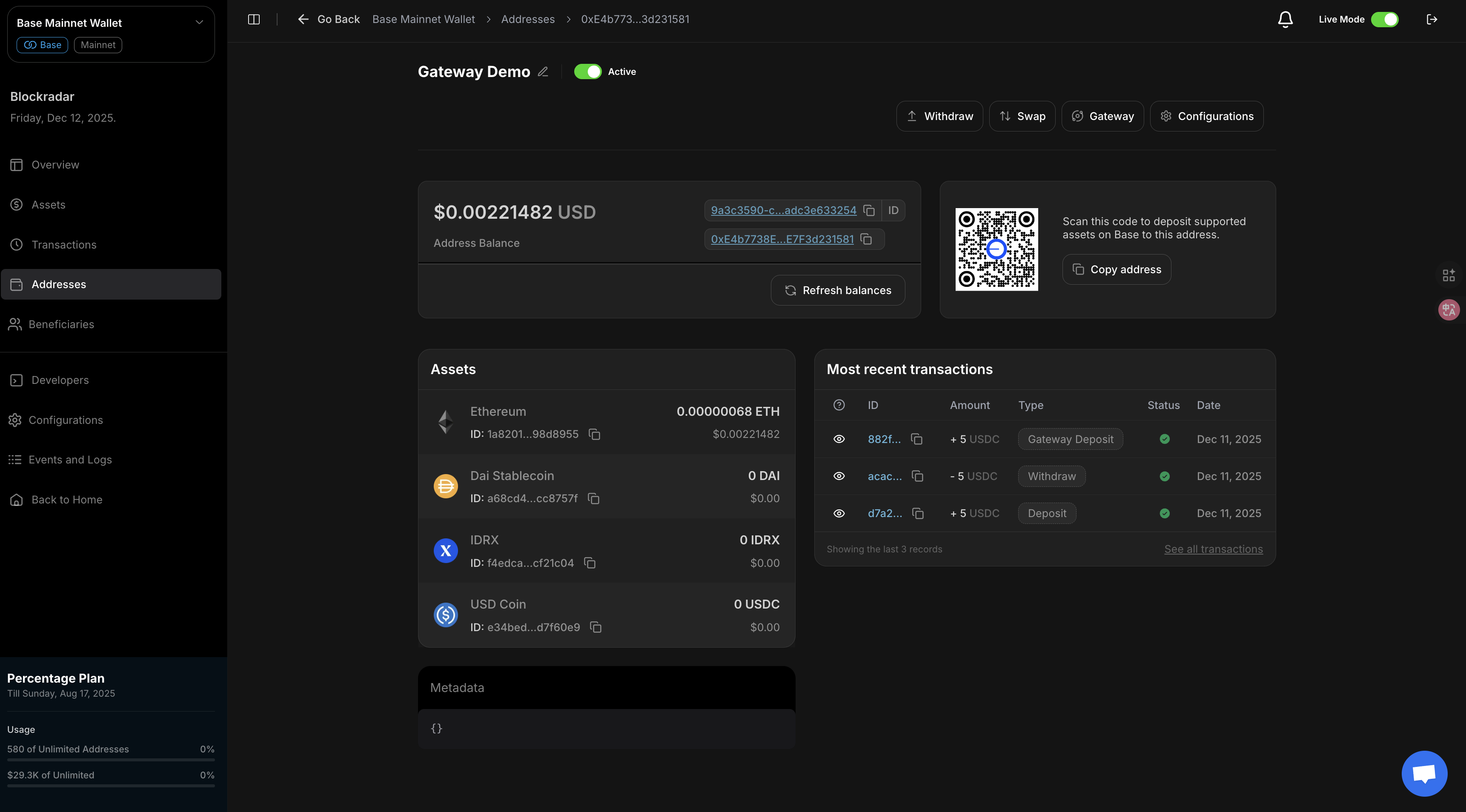
You can access Gateway features directly from the child address page in the dashboard:
* [POST /addresses/{addressId}/gateway/deposit/{walletId}](/en/api-reference/gateway/child-address-deposit) – Deposit USDC to Gateway balance for a child address
* [POST /addresses/{addressId}/gateway/withdraw](/en/api-reference/gateway/child-address-withdraw) – Withdraw USDC from Gateway balance for a child address to any supported chain
* [GET /addresses/{addressId}/gateway/transactions](/en/api-reference/gateway/child-address-transactions) – Review all Gateway-related transactions for a child address
* [GET /addresses/{addressId}/gateway/balance](/en/api-reference/gateway/child-address-get-balance) – Query unified USDC balance for child address
* [POST /addresses/{addressId}/gateway/deposit/{walletId} /network-fee](/en/api-reference/gateway/child-address-deposit-network-fee) – Get deposit network fee estimate for child address
* [POST /addresses/{addressId}/gateway/withdraw/network-fee](/en/api-reference/gateway/child-address-withdraw-network-fee) – Get withdrawal network fee estimate for child address
{" "}
Do NOT send USDC directly to Gateway Wallet contract using a standard token transfer—this
will result in permanent loss of funds. Only use the official API methods for deposits.{" "}
{" "}
* Gateway displays network fees prior to deposit or withdrawal; fees are deducted
from your master wallet balance.{" "}
***
## Dashboard Overview
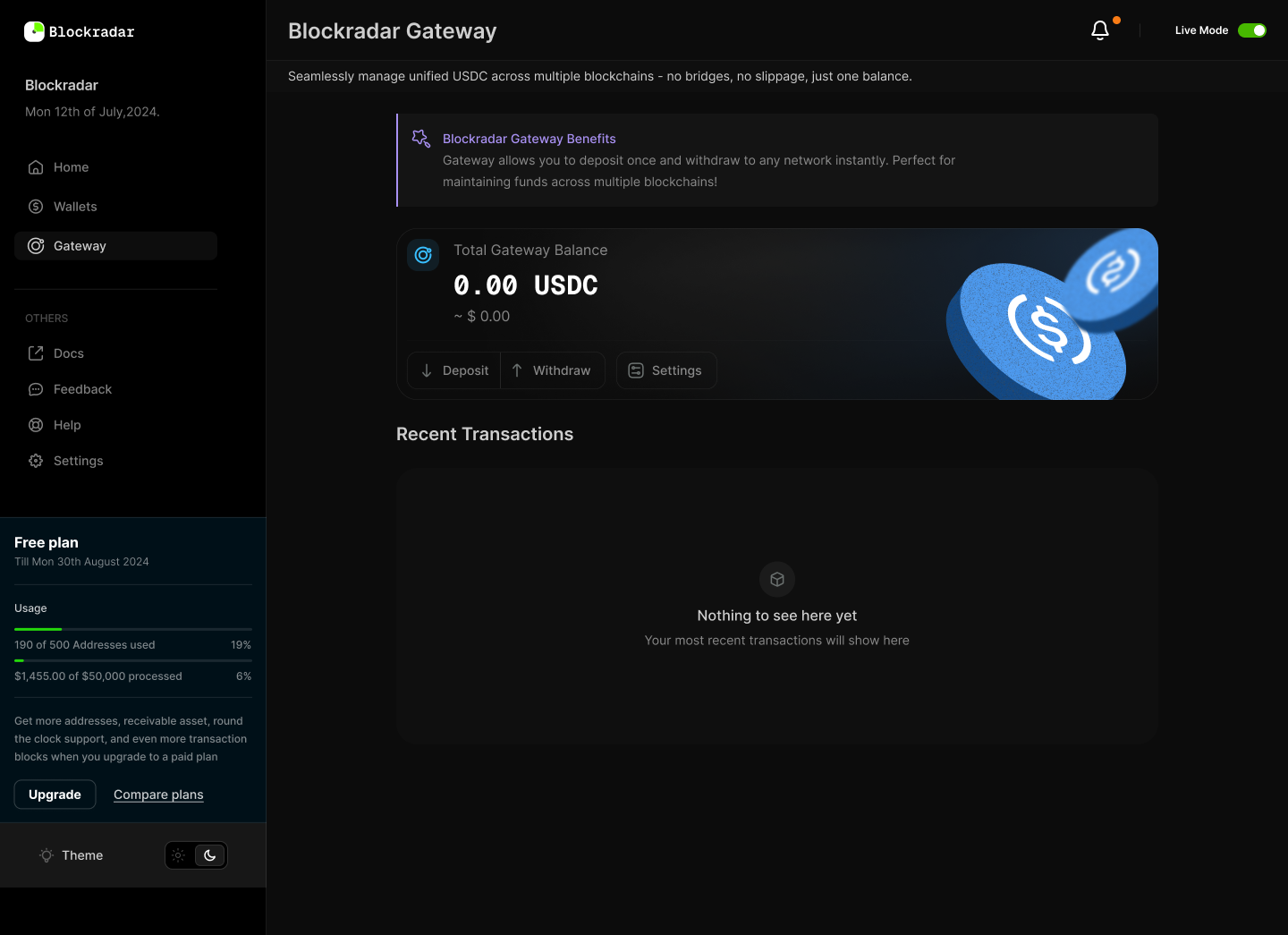
The Gateway dashboard provides an intuitive UI for managing your unified USDC balance. You can create rules, monitor balances, and configure settlement preferences without touching the API.
### Key dashboard sections:
* **Wallets** – View all linked wallets and their unified balances
* **Transactions** – Track deposits, withdrawals, and settlement activity.
* **Gateway Rules** – Configure auto-settlement rules for incoming deposits.
***
## Auto Settlement Configuration
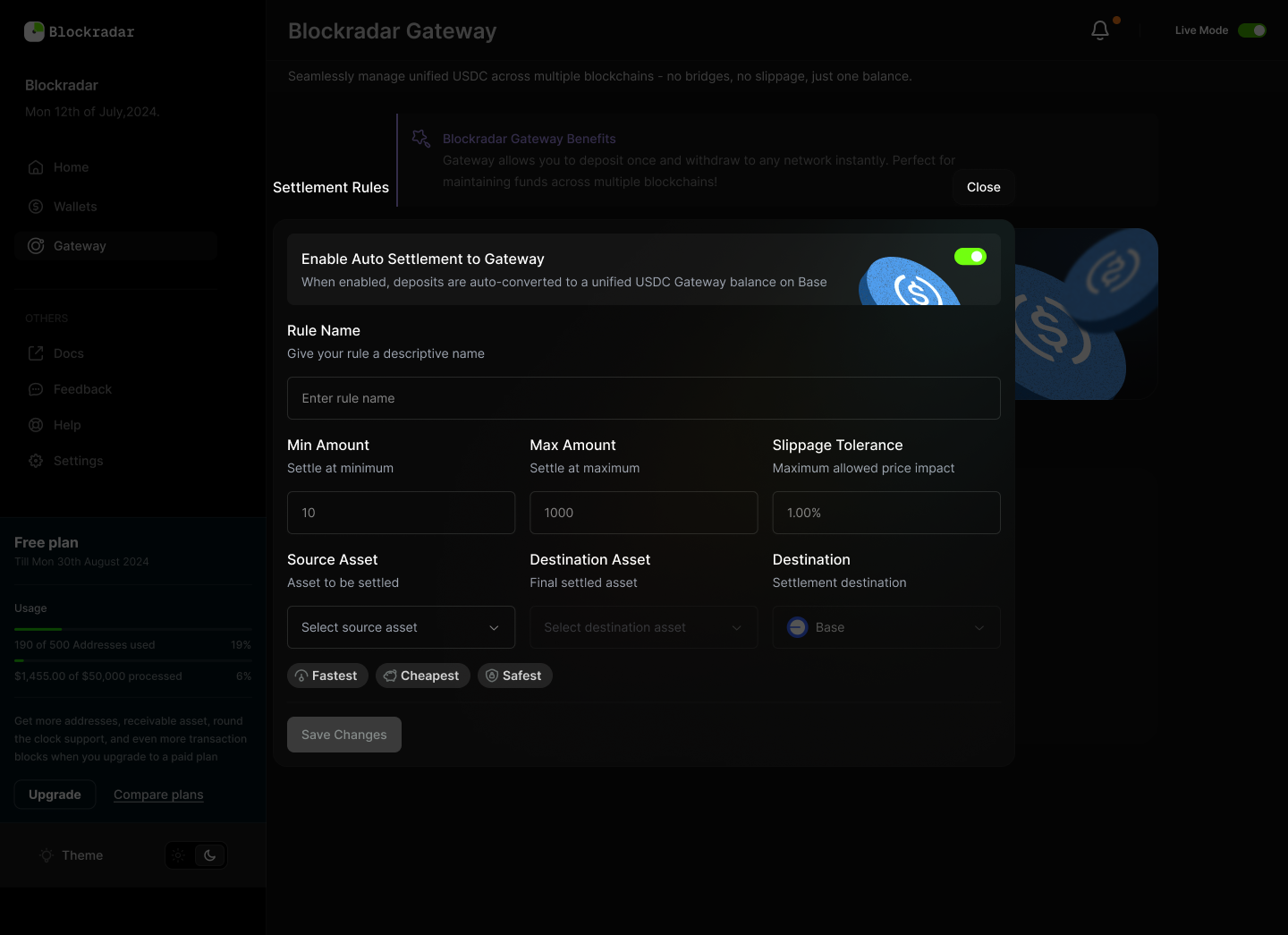
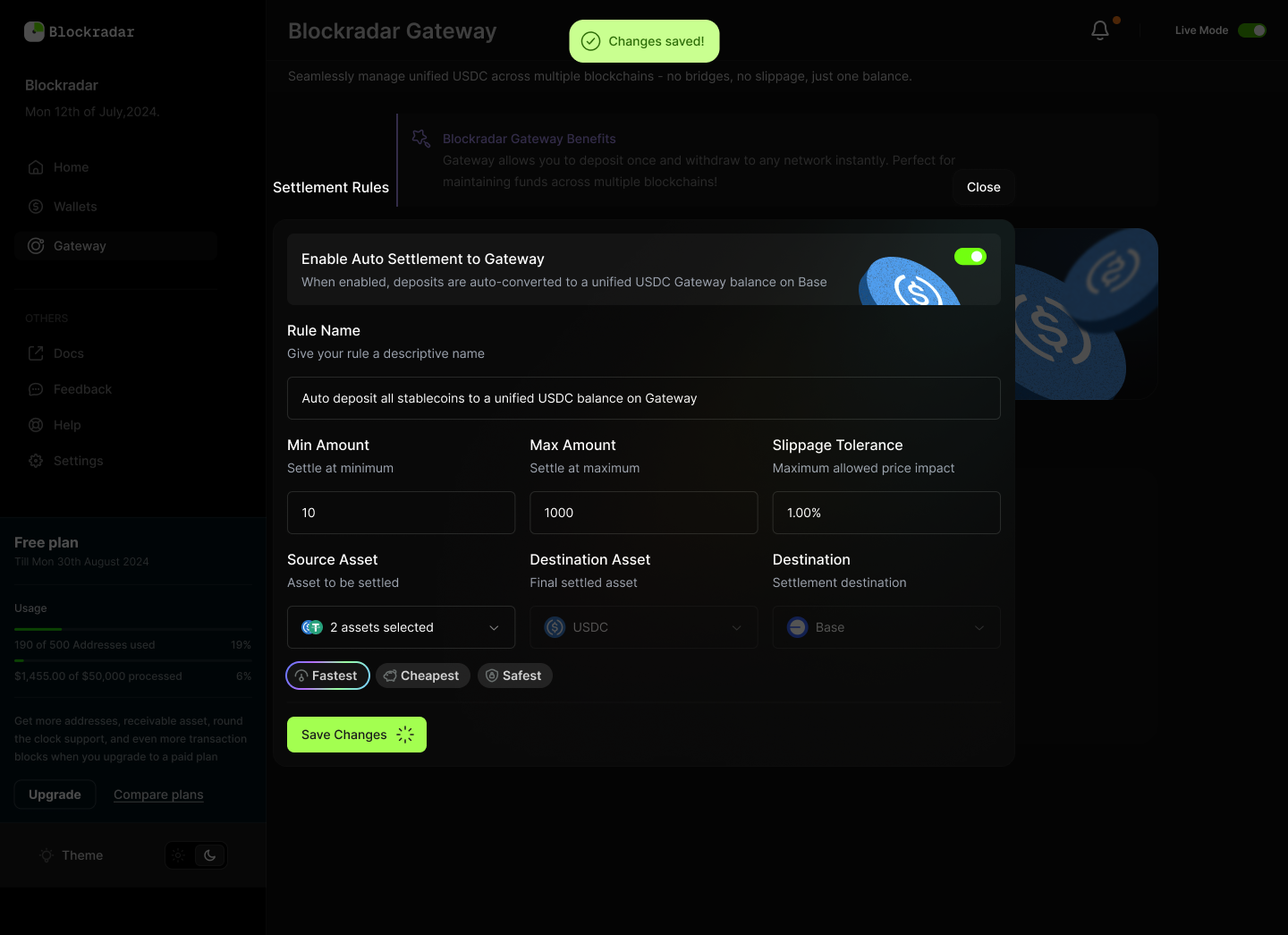
Auto Settlement rules allow deposits to be automatically converted into a unified USDC balance on your chosen destination chain (e.g., Base). This removes the need to manually swap or bridge assets.
autosettlement-gateway1.png
### Why Auto Settlement Matters
* **Reduces fragmentation** – All incoming stablecoins are normalized into USDC.
* **Saves time** – No need to manually monitor or convert deposits.
* **Risk management** – Apply slippage tolerance and rules to protect against bad executions.
* **Operational efficiency** – Ensures your treasury always sits in a single, chain-abstracted balance.
***
## Creating a Settlement Rule
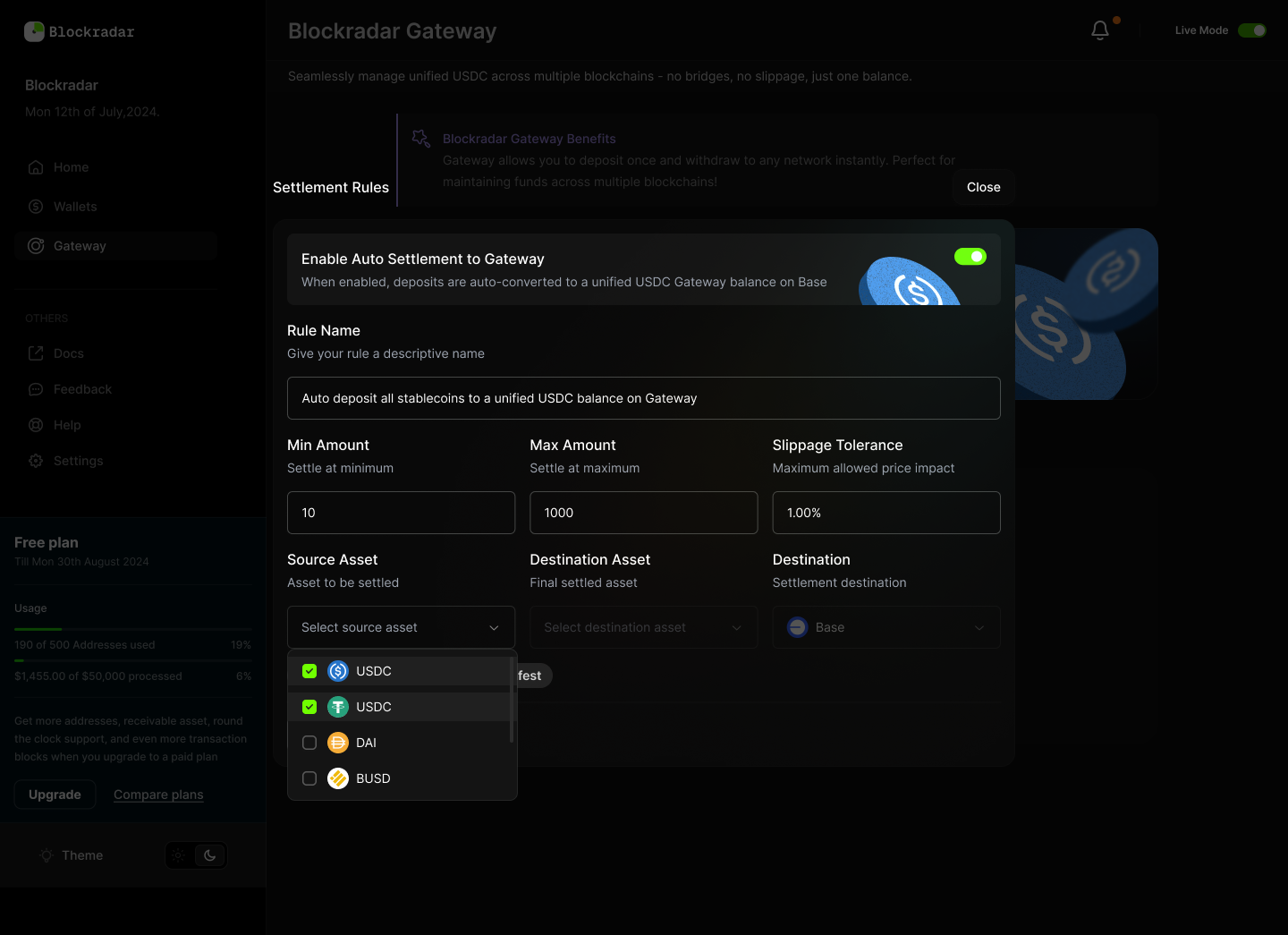
Each rule lets you define how and when incoming deposits are settled:
* **Rule Name** – Give your settlement rule a descriptive name.
* **Min/Max Amount** – Control the size of deposits that trigger settlement.
* **Slippage Tolerance** – Protects against high volatility or poor execution.
* **Source Asset** – Choose which assets to auto-settle (e.g., USDT, DAI).
* **Destination Asset** – Typically USDC, unified in Gateway.
* **Destination Chain** – Select your target chain (e.g., Base).
* **Settlement Preference** – Optimize for *Fastest*, *Cheapest*, or *Safest* execution.
Once saved, rules are automatically applied to deposits matching your criteria.
***
## Deposit Finality
When depositing into Gateway, funds are credited to your unified balance only after the transaction reaches **finality** on the source chain.\
Finality depends on each chain’s consensus rules and required block confirmations.
***
### Testnet
| Chain | Source | Destination |
| -------------------- | -------------- | -------------- |
| **Avalanche Fuji** | ✔ | ✔ |
| **Base Sepolia** | ✔ | ✔ |
| **Ethereum Sepolia** | ✔ | ✔ |
You can get test assets on the test environments listed out
[here](/en/essentials/wallets#test-environment)
### Mainnet
| Chain | Source | Destination |
| ------------- | -------------- | -------------- |
| **Arbitrum** | ✔ | ✔ |
| **Avalanche** | ✔ | ✔ |
| **Base** | ✔ | ✔ |
| **Ethereum** | ✔ | ✔ |
| **Optimism** | ✔ | ✔ |
| **Polygon** | ✔ | ✔ |
***
### Required Confirmations & Finality Times
| Chain | Confirmations | Approx. Time to Finality |
| ------------- | --------------- | ------------------------ |
| **Arbitrum** | \~65 ETH blocks | \~13 to 19 minutes |
| **Avalanche** | 1 | \~8 seconds |
| **Base** | \~65 ETH blocks | \~13 to 19 minutes |
| **Ethereum** | \~65 | \~13–19 minutes |
| **Optimism** | \~65 ETH blocks | \~13 to 19 minutes |
| **Polygon** | \~2-3 | \~8 seconds |
***
Gateway only credits your balance **after finality is reached**. Make sure to
account for these confirmation times when designing user-facing flows,
especially if supporting both testnet and mainnet.
Happy hacking! ❤️
 * [POST /addresses/{addressId}/gateway/deposit/{walletId}](/en/api-reference/gateway/child-address-deposit) – Deposit USDC to Gateway balance for a child address
* [POST /addresses/{addressId}/gateway/withdraw](/en/api-reference/gateway/child-address-withdraw) – Withdraw USDC from Gateway balance for a child address to any supported chain
* [GET /addresses/{addressId}/gateway/transactions](/en/api-reference/gateway/child-address-transactions) – Review all Gateway-related transactions for a child address
* [GET /addresses/{addressId}/gateway/balance](/en/api-reference/gateway/child-address-get-balance) – Query unified USDC balance for child address
* [POST /addresses/{addressId}/gateway/deposit/{walletId} /network-fee](/en/api-reference/gateway/child-address-deposit-network-fee) – Get deposit network fee estimate for child address
* [POST /addresses/{addressId}/gateway/withdraw/network-fee](/en/api-reference/gateway/child-address-withdraw-network-fee) – Get withdrawal network fee estimate for child address
* [POST /addresses/{addressId}/gateway/deposit/{walletId}](/en/api-reference/gateway/child-address-deposit) – Deposit USDC to Gateway balance for a child address
* [POST /addresses/{addressId}/gateway/withdraw](/en/api-reference/gateway/child-address-withdraw) – Withdraw USDC from Gateway balance for a child address to any supported chain
* [GET /addresses/{addressId}/gateway/transactions](/en/api-reference/gateway/child-address-transactions) – Review all Gateway-related transactions for a child address
* [GET /addresses/{addressId}/gateway/balance](/en/api-reference/gateway/child-address-get-balance) – Query unified USDC balance for child address
* [POST /addresses/{addressId}/gateway/deposit/{walletId} /network-fee](/en/api-reference/gateway/child-address-deposit-network-fee) – Get deposit network fee estimate for child address
* [POST /addresses/{addressId}/gateway/withdraw/network-fee](/en/api-reference/gateway/child-address-withdraw-network-fee) – Get withdrawal network fee estimate for child address
 ### Key dashboard sections:
* **Wallets** – View all linked wallets and their unified balances
* **Transactions** – Track deposits, withdrawals, and settlement activity.
* **Gateway Rules** – Configure auto-settlement rules for incoming deposits.
***
## Auto Settlement Configuration
Auto Settlement rules allow deposits to be automatically converted into a unified USDC balance on your chosen destination chain (e.g., Base). This removes the need to manually swap or bridge assets.
autosettlement-gateway1.png
### Key dashboard sections:
* **Wallets** – View all linked wallets and their unified balances
* **Transactions** – Track deposits, withdrawals, and settlement activity.
* **Gateway Rules** – Configure auto-settlement rules for incoming deposits.
***
## Auto Settlement Configuration
Auto Settlement rules allow deposits to be automatically converted into a unified USDC balance on your chosen destination chain (e.g., Base). This removes the need to manually swap or bridge assets.
autosettlement-gateway1.png
 ### Why Auto Settlement Matters
* **Reduces fragmentation** – All incoming stablecoins are normalized into USDC.
* **Saves time** – No need to manually monitor or convert deposits.
* **Risk management** – Apply slippage tolerance and rules to protect against bad executions.
* **Operational efficiency** – Ensures your treasury always sits in a single, chain-abstracted balance.
***
## Creating a Settlement Rule
Each rule lets you define how and when incoming deposits are settled:
### Why Auto Settlement Matters
* **Reduces fragmentation** – All incoming stablecoins are normalized into USDC.
* **Saves time** – No need to manually monitor or convert deposits.
* **Risk management** – Apply slippage tolerance and rules to protect against bad executions.
* **Operational efficiency** – Ensures your treasury always sits in a single, chain-abstracted balance.
***
## Creating a Settlement Rule
Each rule lets you define how and when incoming deposits are settled:
 * **Rule Name** – Give your settlement rule a descriptive name.
* **Min/Max Amount** – Control the size of deposits that trigger settlement.
* **Slippage Tolerance** – Protects against high volatility or poor execution.
* **Source Asset** – Choose which assets to auto-settle (e.g., USDT, DAI).
* **Destination Asset** – Typically USDC, unified in Gateway.
* **Destination Chain** – Select your target chain (e.g., Base).
* **Settlement Preference** – Optimize for *Fastest*, *Cheapest*, or *Safest* execution.
* **Rule Name** – Give your settlement rule a descriptive name.
* **Min/Max Amount** – Control the size of deposits that trigger settlement.
* **Slippage Tolerance** – Protects against high volatility or poor execution.
* **Source Asset** – Choose which assets to auto-settle (e.g., USDT, DAI).
* **Destination Asset** – Typically USDC, unified in Gateway.
* **Destination Chain** – Select your target chain (e.g., Base).
* **Settlement Preference** – Optimize for *Fastest*, *Cheapest*, or *Safest* execution.
 Once saved, rules are automatically applied to deposits matching your criteria.
***
## Deposit Finality
When depositing into Gateway, funds are credited to your unified balance only after the transaction reaches **finality** on the source chain.\
Finality depends on each chain’s consensus rules and required block confirmations.
***
### Testnet
| Chain | Source | Destination |
| -------------------- | -------------- | -------------- |
| **Avalanche Fuji** | ✔ | ✔ |
| **Base Sepolia** | ✔ | ✔ |
| **Ethereum Sepolia** | ✔ | ✔ |
Once saved, rules are automatically applied to deposits matching your criteria.
***
## Deposit Finality
When depositing into Gateway, funds are credited to your unified balance only after the transaction reaches **finality** on the source chain.\
Finality depends on each chain’s consensus rules and required block confirmations.
***
### Testnet
| Chain | Source | Destination |
| -------------------- | -------------- | -------------- |
| **Avalanche Fuji** | ✔ | ✔ |
| **Base Sepolia** | ✔ | ✔ |
| **Ethereum Sepolia** | ✔ | ✔ |