> ## Documentation Index
> Fetch the complete documentation index at: https://docs.blockradar.co/llms.txt
> Use this file to discover all available pages before exploring further.
# Liquidity Pool
> Provide liquidity and manage exchange rates for asset pairs
In a nutshell
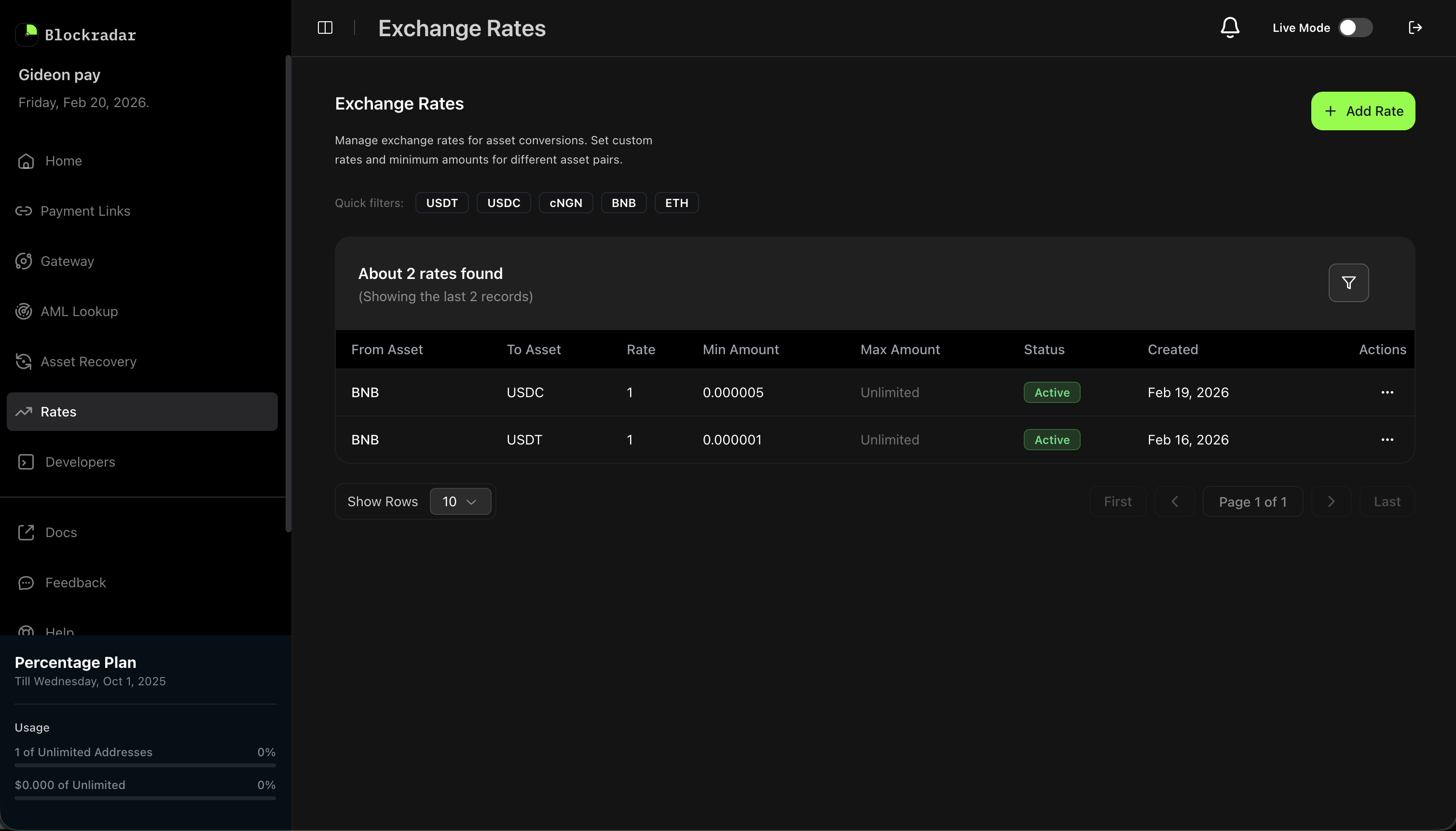
Blockradar's Liquidity Pool allows approved Liquidity Providers (LPs) to define and manage exchange rates for asset pairs. Rates power the internal swap engine — when a user initiates a swap, the system automatically selects the best available rate from active LPs, validates liquidity, and executes the transaction.
 ## Prerequisites
Before using the Liquidity Pool API, ensure you have:
The Liquidity Pool is available to approved Liquidity Providers only. To get started, [fill out the LP application form](https://airtable.com/appBkyXEaGJaQeMxF/pagmjSZwFRFa9OSme/form) and the Blockradar team will review your application and onboard you.
Once onboarded, generate an API key from the [Blockradar Dashboard](https://dashboard.blockradar.co). Navigate to **Developers** to create one.
Ensure your treasury wallets have sufficient balance of the assets you plan to provide liquidity for, plus native tokens to cover network fees.
## How It Works
As a Liquidity Provider, you define exchange rates for asset pairs (e.g., BNB → USDC). When a user on the Blockradar platform initiates a swap, the system:
1. **Finds matching rates** from all active LPs for the requested asset pair.
2. **Ranks candidates** by best rate, LP priority, and creation time.
3. **Validates liquidity** by checking the selected LP's treasury wallet has enough balance to fulfill the swap.
4. **Executes the swap** using the selected LP's rate and treasury.
Create, update, deactivate, and reactivate exchange rates for any supported asset pair.
Define minimum and maximum transaction amounts per rate to control exposure and segment pricing tiers.
Every rate change creates a new version. Full history is preserved for auditing and analytics.
The system automatically selects the best LP for each swap based on rate, priority, and available liquidity.
## Rate Lifecycle
Rates follow a clear lifecycle with full version tracking:
### 1. Create a Rate
Define a new exchange rate for an asset pair. The rate starts as **active** at version 1.
```bash Curl theme={null}
curl --request POST \
--url https://api.blockradar.co/v1/rates \
--header 'Content-Type: application/json' \
--header 'x-api-key: ' \
--data '{
"fromAsset": "BNB",
"toAsset": "USDC",
"rate": "605.50",
"minAmount": "0.01",
"maxAmount": "100"
}'
```
```javascript JavaScript theme={null}
const response = await fetch('https://api.blockradar.co/v1/rates', {
method: 'POST',
headers: {
'Content-Type': 'application/json',
'x-api-key': apiKey
},
body: JSON.stringify({
fromAsset: 'BNB',
toAsset: 'USDC',
rate: '605.50',
minAmount: '0.01',
maxAmount: '100'
})
}).then(r => r.json());
console.log('Rate created:', response.data);
```
### Request Parameters
| Parameter | Type | Required | Description |
| ----------- | ------ | -------- | -------------------------------------------------------------------------------- |
| `fromAsset` | string | Yes | The symbol of the asset to convert **from** (e.g., `BNB`) |
| `toAsset` | string | Yes | The symbol of the asset to convert **to** (e.g., `USDC`) |
| `rate` | string | Yes | The exchange rate. Provided as a string to avoid floating point precision issues |
| `minAmount` | string | Yes | Minimum transaction amount for this rate (inclusive) |
| `maxAmount` | string | No | Maximum transaction amount (exclusive). Omit for unlimited |
### Create Response
```json theme={null}
{
"message": "Rate created successfully",
"statusCode": 201,
"data": {
"id": "d69078ef-2467-40f4-bb00-63394efe32c0",
"fromAsset": "BNB",
"toAsset": "USDC",
"rate": "605.50",
"minAmount": "0.01",
"maxAmount": "100",
"isActive": true,
"status": "active",
"version": 1,
"network": "testnet",
"createdAt": "2026-02-19T07:50:17.042Z"
}
}
```
### 2. Update a Rate
Modify the rate or amount constraints for an existing active rate. This creates a **new version** — the previous version is automatically marked as `superseded`.
```bash Curl theme={null}
curl --request PATCH \
--url https://api.blockradar.co/v1/rates/{id} \
--header 'Content-Type: application/json' \
--header 'x-api-key: ' \
--data '{
"rate": "610.00",
"minAmount": "0.005"
}'
```
```javascript JavaScript theme={null}
const response = await fetch(`https://api.blockradar.co/v1/rates/${rateId}`, {
method: 'PATCH',
headers: {
'Content-Type': 'application/json',
'x-api-key': apiKey
},
body: JSON.stringify({
rate: '610.00',
minAmount: '0.005'
})
}).then(r => r.json());
console.log('Rate updated:', response.data);
```
Only provide the fields you want to change — partial updates are supported.
### 3. Deactivate a Rate
Temporarily take a rate offline. The rate becomes **deactivated** and will no longer be selected for swaps.
```bash Curl theme={null}
curl --request PATCH \
--url https://api.blockradar.co/v1/rates/{id}/deactivate \
--header 'Content-Type: application/json' \
--header 'x-api-key: ' \
--data '{
"reason": "Pausing for maintenance"
}'
```
```javascript JavaScript theme={null}
const response = await fetch(
`https://api.blockradar.co/v1/rates/${rateId}/deactivate`,
{
method: 'PATCH',
headers: {
'Content-Type': 'application/json',
'x-api-key': apiKey
},
body: JSON.stringify({
reason: 'Pausing for maintenance'
})
}
).then(r => r.json());
console.log('Rate deactivated:', response.data);
```
### 4. Reactivate a Rate
Bring a deactivated rate back online. This creates a **new version** with `active` status.
```bash Curl theme={null}
curl --request PATCH \
--url https://api.blockradar.co/v1/rates/{id}/reactivate \
--header 'x-api-key: '
```
```javascript JavaScript theme={null}
const response = await fetch(
`https://api.blockradar.co/v1/rates/${rateId}/reactivate`,
{
method: 'PATCH',
headers: { 'x-api-key': apiKey }
}
).then(r => r.json());
console.log('Rate reactivated:', response.data);
```
## Pricing Tools
Before quoting a new tier or repricing an existing one, use the pricing tools to inspect your own coverage and benchmark against other Liquidity Providers in the same business segment.
### Check Active Rates for a Pair
`GET /rates/check-pair` returns every active rate you have configured for an asset pair on the current environment, including the amount band of each. Use it to confirm whether you are already quoting a pair before opening a new tier.
```bash Curl theme={null}
curl --request GET \
--url 'https://api.blockradar.co/v1/rates/check-pair?fromAsset=USDT&toAsset=cNGN' \
--header 'x-api-key: '
```
```javascript JavaScript theme={null}
const response = await fetch(
'https://api.blockradar.co/v1/rates/check-pair?fromAsset=USDT&toAsset=cNGN',
{ headers: { 'x-api-key': apiKey } }
).then(r => r.json());
console.log('Active rates:', response.data.rates);
```
```json Response theme={null}
{
"message": "Pair check completed",
"statusCode": 200,
"data": {
"fromAsset": "USDT",
"toAsset": "cNGN",
"hasActiveRates": true,
"activeRateCount": 2,
"rates": [
{
"id": "d69078ef-2467-40f4-bb00-63394efe32c0",
"rate": "1545.00",
"minAmount": "10",
"maxAmount": "1000",
"version": 1,
"createdAt": "2026-04-12T09:14:22.501Z"
},
{
"id": "5b6683f0-6e92-4eaf-ae8d-5f2ddd76b376",
"rate": "1547.50",
"minAmount": "1000",
"maxAmount": null,
"version": 3,
"createdAt": "2026-04-12T09:18:41.022Z"
}
]
}
}
```
### Benchmark Against Other LPs
`GET /rates/market-benchmark` returns the best competing rate for an asset pair across other Liquidity Providers in your business segment. Your own rates are excluded so you can see what you are pricing against. Results are cached for 60 seconds per pair.
Pass `amount` to restrict the benchmark to rates whose band covers that transaction size, or pass `pairs` (comma-separated `from:to` entries, max 20) to get an array of benchmarks in a single call.
```bash Single pair theme={null}
curl --request GET \
--url 'https://api.blockradar.co/v1/rates/market-benchmark?fromAsset=USDT&toAsset=cNGN' \
--header 'x-api-key: '
```
```bash Batch theme={null}
curl --request GET \
--url 'https://api.blockradar.co/v1/rates/market-benchmark?pairs=USDT:cNGN,cNGN:USDT' \
--header 'x-api-key: '
```
```javascript JavaScript theme={null}
const single = await fetch(
'https://api.blockradar.co/v1/rates/market-benchmark?fromAsset=USDT&toAsset=cNGN',
{ headers: { 'x-api-key': apiKey } }
).then(r => r.json());
const batch = await fetch(
'https://api.blockradar.co/v1/rates/market-benchmark?pairs=USDT:cNGN,cNGN:USDT',
{ headers: { 'x-api-key': apiKey } }
).then(r => r.json());
```
```json Single pair response theme={null}
{
"message": "Market benchmark retrieved",
"statusCode": 200,
"data": {
"fromAsset": "USDT",
"toAsset": "cNGN",
"bestRate": "1547.50"
}
}
```
```json Batch response theme={null}
{
"message": "Market benchmark retrieved",
"statusCode": 200,
"data": [
{ "fromAsset": "USDT", "toAsset": "cNGN", "bestRate": "1547.50" },
{ "fromAsset": "cNGN", "toAsset": "USDT", "bestRate": "0.000647" }
]
}
```
`bestRate` is `null` when no other LP has an active rate for the pair (or for the supplied amount band).
### Inspect Treasury Balances
`GET /rates/treasury-balances` returns aggregated treasury balances for every asset that appears in your active rates, broken down by blockchain. Use it to monitor liquidity coverage across the pairs you are quoting.
The response excludes assets with a zero on-chain balance and de-duplicates entries when the same asset/wallet pair is referenced by multiple rates.
```bash Curl theme={null}
curl --request GET \
--url https://api.blockradar.co/v1/rates/treasury-balances \
--header 'x-api-key: '
```
```javascript JavaScript theme={null}
const response = await fetch(
'https://api.blockradar.co/v1/rates/treasury-balances',
{ headers: { 'x-api-key': apiKey } }
).then(r => r.json());
console.log('Treasury balances:', response.data);
```
```json Response theme={null}
{
"message": "Treasury balances retrieved successfully",
"statusCode": 200,
"data": [
{
"asset": "USDT",
"totalBalance": "5000.00",
"totalConvertedBalance": "5000.00",
"chains": [
{
"blockchain": "ethereum",
"balance": "3000.00",
"convertedBalance": "3000.00",
"walletAddress": "0xA1b2C3d4E5f6789012345678901234567890aBcD"
},
{
"blockchain": "polygon",
"balance": "2000.00",
"convertedBalance": "2000.00",
"walletAddress": "0xA1b2C3d4E5f6789012345678901234567890aBcD"
}
]
}
]
}
```
## Rate Versioning
Every time a rate is updated or reactivated, a new version is created. The previous version is marked as `superseded`. This provides a complete audit trail.
| Field | Description |
| ---------------- | ------------------------------------------------------------------- |
| `version` | Sequential version number starting at 1 |
| `rootRateId` | Points to the original rate — all versions in a chain share this ID |
| `previousRateId` | Points to the immediately preceding version |
### Version Chain Example
```
v1 (active) → v2 (active, v1 superseded) → v3 (deactivated) → v4 (active, v3 superseded)
```
### View Rate History
Retrieve the full version history for a rate:
```bash Curl theme={null}
curl --request GET \
--url https://api.blockradar.co/v1/rates/{id}/history \
--header 'x-api-key: '
```
```javascript JavaScript theme={null}
const response = await fetch(
`https://api.blockradar.co/v1/rates/${rateId}/history`,
{
headers: { 'x-api-key': apiKey }
}
).then(r => r.json());
console.log('History:', response.data);
console.log('Page:', response.meta.currentPage);
```
### History Response
```json theme={null}
{
"message": "Rate history retrieved successfully",
"statusCode": 200,
"data": [
{
"id": "d69078ef-2467-40f4-bb00-63394efe32c0",
"fromAsset": "BNB",
"toAsset": "USDC",
"network": "testnet",
"rate": "605.50",
"minAmount": "0.01",
"maxAmount": null,
"isActive": false,
"status": "deactivated",
"version": 1,
"previousRateId": null,
"rootRateId": null,
"createdBy": "86964e42-79dc-4267-a2ca-3612c4b095a8",
"deactivatedBy": "86964e42-79dc-4267-a2ca-3612c4b095a8",
"deactivatedAt": "2026-02-25T18:13:48.113Z",
"deactivationReason": "re",
"createdAt": "2026-02-19T07:50:17.042Z",
"updatedAt": "2026-02-25T18:13:48.101Z"
}
],
"meta": {
"totalItems": 1,
"itemCount": 1,
"itemsPerPage": 10,
"totalPages": 1,
"currentPage": 1
}
}
```
## Rate Statuses
| Status | Description |
| ------------- | ------------------------------------------------------ |
| `active` | Currently live and eligible for swap selection |
| `superseded` | Replaced by a newer version (via update or reactivate) |
| `deactivated` | Manually taken offline — can be reactivated |
`superseded` is a terminal state — these records are historical and cannot be modified.
## Amount Bands
Each rate covers a transaction amount range defined by `minAmount` and `maxAmount`:
* **`minAmount`** — The inclusive lower bound. Transactions below this amount will not use this rate.
* **`maxAmount`** — The exclusive upper bound. Set to `null` (omit) for unlimited.
### Multiple Rates for the Same Pair
You can create multiple rates for the same asset pair with different amount bands to offer tiered pricing:
| Rate | Band | Use Case |
| ------ | ------------- | ------------------- |
| 605.00 | 0.01 – 10 BNB | Small transactions |
| 606.50 | 10 – 100 BNB | Medium transactions |
| 608.00 | 100+ BNB | Large transactions |
Amount bands for the same asset pair **must not overlap**. The system will reject a rate if its band overlaps with another active rate for the same pair.
## Liquidity Validation
Before executing a swap using your rate, the system validates that your treasury wallet has:
1. **Sufficient token balance** of the destination asset to cover the swap output (`amount x rate`).
2. **Sufficient native token balance** (ETH, BNB, etc.) to cover network fees for the transfer.
If your wallet balance is insufficient, the system skips your rate and moves to the next available LP. You will receive an alert via email when your liquidity is low.
Keep your treasury wallets well-funded to avoid missed swap opportunities. The system will notify you when balances drop below thresholds.
## Best Practices
### Rate Management
* **Monitor market conditions** and update rates regularly to stay competitive
* **Use amount bands** to offer tiered pricing for different transaction sizes
* **Deactivate rates** during maintenance or high volatility instead of deleting them
* **Review version history** to track rate changes over time
### Liquidity
* **Maintain sufficient balance** in your treasury wallets for both the destination asset and native tokens
* **Set up monitoring** for low balance alerts
* **Fund wallets proactively** to avoid gaps in service
## API Reference
| Endpoint | Description |
| ------------------------------------------------------------------------------- | ------------------------------------------------------------------------ |
| [Create Rate](/en/api-reference/liquidity-pool/create-rate) | Create a new exchange rate for an asset pair |
| [Get Rate](/en/api-reference/liquidity-pool/get-rate) | Retrieve a single rate by ID |
| [Update Rate](/en/api-reference/liquidity-pool/update-rate) | Update an existing rate (creates a new version) |
| [Deactivate Rate](/en/api-reference/liquidity-pool/deactivate-rate) | Take a rate offline |
| [Reactivate Rate](/en/api-reference/liquidity-pool/reactivate-rate) | Bring a deactivated rate back online |
| [Get Rate History](/en/api-reference/liquidity-pool/get-rate-history) | View full version history for a rate |
| [Check Pair](/en/api-reference/liquidity-pool/check-pair) | List your active rates for a specific asset pair |
| [Get Market Benchmark](/en/api-reference/liquidity-pool/get-market-benchmark) | Best competing rate for a pair (or a batch of pairs), excluding your own |
| [Get Treasury Balances](/en/api-reference/liquidity-pool/get-treasury-balances) | Aggregated treasury balances grouped by asset and blockchain |
## Support
* **Email**: [support@blockradar.co](mailto:support@blockradar.co)
* **Become an LP**: [Apply here](https://airtable.com/appBkyXEaGJaQeMxF/pagmjSZwFRFa9OSme/form) to express your interest in becoming a Liquidity Provider
The Liquidity Pool is designed for institutional and professional liquidity providers. [Apply to become an LP](https://airtable.com/appBkyXEaGJaQeMxF/pagmjSZwFRFa9OSme/form), then test your rate configurations on testnet before going live.
## Prerequisites
Before using the Liquidity Pool API, ensure you have:
The Liquidity Pool is available to approved Liquidity Providers only. To get started, [fill out the LP application form](https://airtable.com/appBkyXEaGJaQeMxF/pagmjSZwFRFa9OSme/form) and the Blockradar team will review your application and onboard you.
Once onboarded, generate an API key from the [Blockradar Dashboard](https://dashboard.blockradar.co). Navigate to **Developers** to create one.
Ensure your treasury wallets have sufficient balance of the assets you plan to provide liquidity for, plus native tokens to cover network fees.
## How It Works
As a Liquidity Provider, you define exchange rates for asset pairs (e.g., BNB → USDC). When a user on the Blockradar platform initiates a swap, the system:
1. **Finds matching rates** from all active LPs for the requested asset pair.
2. **Ranks candidates** by best rate, LP priority, and creation time.
3. **Validates liquidity** by checking the selected LP's treasury wallet has enough balance to fulfill the swap.
4. **Executes the swap** using the selected LP's rate and treasury.
Create, update, deactivate, and reactivate exchange rates for any supported asset pair.
Define minimum and maximum transaction amounts per rate to control exposure and segment pricing tiers.
Every rate change creates a new version. Full history is preserved for auditing and analytics.
The system automatically selects the best LP for each swap based on rate, priority, and available liquidity.
## Rate Lifecycle
Rates follow a clear lifecycle with full version tracking:
### 1. Create a Rate
Define a new exchange rate for an asset pair. The rate starts as **active** at version 1.
```bash Curl theme={null}
curl --request POST \
--url https://api.blockradar.co/v1/rates \
--header 'Content-Type: application/json' \
--header 'x-api-key: ' \
--data '{
"fromAsset": "BNB",
"toAsset": "USDC",
"rate": "605.50",
"minAmount": "0.01",
"maxAmount": "100"
}'
```
```javascript JavaScript theme={null}
const response = await fetch('https://api.blockradar.co/v1/rates', {
method: 'POST',
headers: {
'Content-Type': 'application/json',
'x-api-key': apiKey
},
body: JSON.stringify({
fromAsset: 'BNB',
toAsset: 'USDC',
rate: '605.50',
minAmount: '0.01',
maxAmount: '100'
})
}).then(r => r.json());
console.log('Rate created:', response.data);
```
### Request Parameters
| Parameter | Type | Required | Description |
| ----------- | ------ | -------- | -------------------------------------------------------------------------------- |
| `fromAsset` | string | Yes | The symbol of the asset to convert **from** (e.g., `BNB`) |
| `toAsset` | string | Yes | The symbol of the asset to convert **to** (e.g., `USDC`) |
| `rate` | string | Yes | The exchange rate. Provided as a string to avoid floating point precision issues |
| `minAmount` | string | Yes | Minimum transaction amount for this rate (inclusive) |
| `maxAmount` | string | No | Maximum transaction amount (exclusive). Omit for unlimited |
### Create Response
```json theme={null}
{
"message": "Rate created successfully",
"statusCode": 201,
"data": {
"id": "d69078ef-2467-40f4-bb00-63394efe32c0",
"fromAsset": "BNB",
"toAsset": "USDC",
"rate": "605.50",
"minAmount": "0.01",
"maxAmount": "100",
"isActive": true,
"status": "active",
"version": 1,
"network": "testnet",
"createdAt": "2026-02-19T07:50:17.042Z"
}
}
```
### 2. Update a Rate
Modify the rate or amount constraints for an existing active rate. This creates a **new version** — the previous version is automatically marked as `superseded`.
```bash Curl theme={null}
curl --request PATCH \
--url https://api.blockradar.co/v1/rates/{id} \
--header 'Content-Type: application/json' \
--header 'x-api-key: ' \
--data '{
"rate": "610.00",
"minAmount": "0.005"
}'
```
```javascript JavaScript theme={null}
const response = await fetch(`https://api.blockradar.co/v1/rates/${rateId}`, {
method: 'PATCH',
headers: {
'Content-Type': 'application/json',
'x-api-key': apiKey
},
body: JSON.stringify({
rate: '610.00',
minAmount: '0.005'
})
}).then(r => r.json());
console.log('Rate updated:', response.data);
```
Only provide the fields you want to change — partial updates are supported.
### 3. Deactivate a Rate
Temporarily take a rate offline. The rate becomes **deactivated** and will no longer be selected for swaps.
```bash Curl theme={null}
curl --request PATCH \
--url https://api.blockradar.co/v1/rates/{id}/deactivate \
--header 'Content-Type: application/json' \
--header 'x-api-key: ' \
--data '{
"reason": "Pausing for maintenance"
}'
```
```javascript JavaScript theme={null}
const response = await fetch(
`https://api.blockradar.co/v1/rates/${rateId}/deactivate`,
{
method: 'PATCH',
headers: {
'Content-Type': 'application/json',
'x-api-key': apiKey
},
body: JSON.stringify({
reason: 'Pausing for maintenance'
})
}
).then(r => r.json());
console.log('Rate deactivated:', response.data);
```
### 4. Reactivate a Rate
Bring a deactivated rate back online. This creates a **new version** with `active` status.
```bash Curl theme={null}
curl --request PATCH \
--url https://api.blockradar.co/v1/rates/{id}/reactivate \
--header 'x-api-key: '
```
```javascript JavaScript theme={null}
const response = await fetch(
`https://api.blockradar.co/v1/rates/${rateId}/reactivate`,
{
method: 'PATCH',
headers: { 'x-api-key': apiKey }
}
).then(r => r.json());
console.log('Rate reactivated:', response.data);
```
## Pricing Tools
Before quoting a new tier or repricing an existing one, use the pricing tools to inspect your own coverage and benchmark against other Liquidity Providers in the same business segment.
### Check Active Rates for a Pair
`GET /rates/check-pair` returns every active rate you have configured for an asset pair on the current environment, including the amount band of each. Use it to confirm whether you are already quoting a pair before opening a new tier.
```bash Curl theme={null}
curl --request GET \
--url 'https://api.blockradar.co/v1/rates/check-pair?fromAsset=USDT&toAsset=cNGN' \
--header 'x-api-key: '
```
```javascript JavaScript theme={null}
const response = await fetch(
'https://api.blockradar.co/v1/rates/check-pair?fromAsset=USDT&toAsset=cNGN',
{ headers: { 'x-api-key': apiKey } }
).then(r => r.json());
console.log('Active rates:', response.data.rates);
```
```json Response theme={null}
{
"message": "Pair check completed",
"statusCode": 200,
"data": {
"fromAsset": "USDT",
"toAsset": "cNGN",
"hasActiveRates": true,
"activeRateCount": 2,
"rates": [
{
"id": "d69078ef-2467-40f4-bb00-63394efe32c0",
"rate": "1545.00",
"minAmount": "10",
"maxAmount": "1000",
"version": 1,
"createdAt": "2026-04-12T09:14:22.501Z"
},
{
"id": "5b6683f0-6e92-4eaf-ae8d-5f2ddd76b376",
"rate": "1547.50",
"minAmount": "1000",
"maxAmount": null,
"version": 3,
"createdAt": "2026-04-12T09:18:41.022Z"
}
]
}
}
```
### Benchmark Against Other LPs
`GET /rates/market-benchmark` returns the best competing rate for an asset pair across other Liquidity Providers in your business segment. Your own rates are excluded so you can see what you are pricing against. Results are cached for 60 seconds per pair.
Pass `amount` to restrict the benchmark to rates whose band covers that transaction size, or pass `pairs` (comma-separated `from:to` entries, max 20) to get an array of benchmarks in a single call.
```bash Single pair theme={null}
curl --request GET \
--url 'https://api.blockradar.co/v1/rates/market-benchmark?fromAsset=USDT&toAsset=cNGN' \
--header 'x-api-key: '
```
```bash Batch theme={null}
curl --request GET \
--url 'https://api.blockradar.co/v1/rates/market-benchmark?pairs=USDT:cNGN,cNGN:USDT' \
--header 'x-api-key: '
```
```javascript JavaScript theme={null}
const single = await fetch(
'https://api.blockradar.co/v1/rates/market-benchmark?fromAsset=USDT&toAsset=cNGN',
{ headers: { 'x-api-key': apiKey } }
).then(r => r.json());
const batch = await fetch(
'https://api.blockradar.co/v1/rates/market-benchmark?pairs=USDT:cNGN,cNGN:USDT',
{ headers: { 'x-api-key': apiKey } }
).then(r => r.json());
```
```json Single pair response theme={null}
{
"message": "Market benchmark retrieved",
"statusCode": 200,
"data": {
"fromAsset": "USDT",
"toAsset": "cNGN",
"bestRate": "1547.50"
}
}
```
```json Batch response theme={null}
{
"message": "Market benchmark retrieved",
"statusCode": 200,
"data": [
{ "fromAsset": "USDT", "toAsset": "cNGN", "bestRate": "1547.50" },
{ "fromAsset": "cNGN", "toAsset": "USDT", "bestRate": "0.000647" }
]
}
```
`bestRate` is `null` when no other LP has an active rate for the pair (or for the supplied amount band).
### Inspect Treasury Balances
`GET /rates/treasury-balances` returns aggregated treasury balances for every asset that appears in your active rates, broken down by blockchain. Use it to monitor liquidity coverage across the pairs you are quoting.
The response excludes assets with a zero on-chain balance and de-duplicates entries when the same asset/wallet pair is referenced by multiple rates.
```bash Curl theme={null}
curl --request GET \
--url https://api.blockradar.co/v1/rates/treasury-balances \
--header 'x-api-key: '
```
```javascript JavaScript theme={null}
const response = await fetch(
'https://api.blockradar.co/v1/rates/treasury-balances',
{ headers: { 'x-api-key': apiKey } }
).then(r => r.json());
console.log('Treasury balances:', response.data);
```
```json Response theme={null}
{
"message": "Treasury balances retrieved successfully",
"statusCode": 200,
"data": [
{
"asset": "USDT",
"totalBalance": "5000.00",
"totalConvertedBalance": "5000.00",
"chains": [
{
"blockchain": "ethereum",
"balance": "3000.00",
"convertedBalance": "3000.00",
"walletAddress": "0xA1b2C3d4E5f6789012345678901234567890aBcD"
},
{
"blockchain": "polygon",
"balance": "2000.00",
"convertedBalance": "2000.00",
"walletAddress": "0xA1b2C3d4E5f6789012345678901234567890aBcD"
}
]
}
]
}
```
## Rate Versioning
Every time a rate is updated or reactivated, a new version is created. The previous version is marked as `superseded`. This provides a complete audit trail.
| Field | Description |
| ---------------- | ------------------------------------------------------------------- |
| `version` | Sequential version number starting at 1 |
| `rootRateId` | Points to the original rate — all versions in a chain share this ID |
| `previousRateId` | Points to the immediately preceding version |
### Version Chain Example
```
v1 (active) → v2 (active, v1 superseded) → v3 (deactivated) → v4 (active, v3 superseded)
```
### View Rate History
Retrieve the full version history for a rate:
```bash Curl theme={null}
curl --request GET \
--url https://api.blockradar.co/v1/rates/{id}/history \
--header 'x-api-key: '
```
```javascript JavaScript theme={null}
const response = await fetch(
`https://api.blockradar.co/v1/rates/${rateId}/history`,
{
headers: { 'x-api-key': apiKey }
}
).then(r => r.json());
console.log('History:', response.data);
console.log('Page:', response.meta.currentPage);
```
### History Response
```json theme={null}
{
"message": "Rate history retrieved successfully",
"statusCode": 200,
"data": [
{
"id": "d69078ef-2467-40f4-bb00-63394efe32c0",
"fromAsset": "BNB",
"toAsset": "USDC",
"network": "testnet",
"rate": "605.50",
"minAmount": "0.01",
"maxAmount": null,
"isActive": false,
"status": "deactivated",
"version": 1,
"previousRateId": null,
"rootRateId": null,
"createdBy": "86964e42-79dc-4267-a2ca-3612c4b095a8",
"deactivatedBy": "86964e42-79dc-4267-a2ca-3612c4b095a8",
"deactivatedAt": "2026-02-25T18:13:48.113Z",
"deactivationReason": "re",
"createdAt": "2026-02-19T07:50:17.042Z",
"updatedAt": "2026-02-25T18:13:48.101Z"
}
],
"meta": {
"totalItems": 1,
"itemCount": 1,
"itemsPerPage": 10,
"totalPages": 1,
"currentPage": 1
}
}
```
## Rate Statuses
| Status | Description |
| ------------- | ------------------------------------------------------ |
| `active` | Currently live and eligible for swap selection |
| `superseded` | Replaced by a newer version (via update or reactivate) |
| `deactivated` | Manually taken offline — can be reactivated |
`superseded` is a terminal state — these records are historical and cannot be modified.
## Amount Bands
Each rate covers a transaction amount range defined by `minAmount` and `maxAmount`:
* **`minAmount`** — The inclusive lower bound. Transactions below this amount will not use this rate.
* **`maxAmount`** — The exclusive upper bound. Set to `null` (omit) for unlimited.
### Multiple Rates for the Same Pair
You can create multiple rates for the same asset pair with different amount bands to offer tiered pricing:
| Rate | Band | Use Case |
| ------ | ------------- | ------------------- |
| 605.00 | 0.01 – 10 BNB | Small transactions |
| 606.50 | 10 – 100 BNB | Medium transactions |
| 608.00 | 100+ BNB | Large transactions |
Amount bands for the same asset pair **must not overlap**. The system will reject a rate if its band overlaps with another active rate for the same pair.
## Liquidity Validation
Before executing a swap using your rate, the system validates that your treasury wallet has:
1. **Sufficient token balance** of the destination asset to cover the swap output (`amount x rate`).
2. **Sufficient native token balance** (ETH, BNB, etc.) to cover network fees for the transfer.
If your wallet balance is insufficient, the system skips your rate and moves to the next available LP. You will receive an alert via email when your liquidity is low.
Keep your treasury wallets well-funded to avoid missed swap opportunities. The system will notify you when balances drop below thresholds.
## Best Practices
### Rate Management
* **Monitor market conditions** and update rates regularly to stay competitive
* **Use amount bands** to offer tiered pricing for different transaction sizes
* **Deactivate rates** during maintenance or high volatility instead of deleting them
* **Review version history** to track rate changes over time
### Liquidity
* **Maintain sufficient balance** in your treasury wallets for both the destination asset and native tokens
* **Set up monitoring** for low balance alerts
* **Fund wallets proactively** to avoid gaps in service
## API Reference
| Endpoint | Description |
| ------------------------------------------------------------------------------- | ------------------------------------------------------------------------ |
| [Create Rate](/en/api-reference/liquidity-pool/create-rate) | Create a new exchange rate for an asset pair |
| [Get Rate](/en/api-reference/liquidity-pool/get-rate) | Retrieve a single rate by ID |
| [Update Rate](/en/api-reference/liquidity-pool/update-rate) | Update an existing rate (creates a new version) |
| [Deactivate Rate](/en/api-reference/liquidity-pool/deactivate-rate) | Take a rate offline |
| [Reactivate Rate](/en/api-reference/liquidity-pool/reactivate-rate) | Bring a deactivated rate back online |
| [Get Rate History](/en/api-reference/liquidity-pool/get-rate-history) | View full version history for a rate |
| [Check Pair](/en/api-reference/liquidity-pool/check-pair) | List your active rates for a specific asset pair |
| [Get Market Benchmark](/en/api-reference/liquidity-pool/get-market-benchmark) | Best competing rate for a pair (or a batch of pairs), excluding your own |
| [Get Treasury Balances](/en/api-reference/liquidity-pool/get-treasury-balances) | Aggregated treasury balances grouped by asset and blockchain |
## Support
* **Email**: [support@blockradar.co](mailto:support@blockradar.co)
* **Become an LP**: [Apply here](https://airtable.com/appBkyXEaGJaQeMxF/pagmjSZwFRFa9OSme/form) to express your interest in becoming a Liquidity Provider
The Liquidity Pool is designed for institutional and professional liquidity providers. [Apply to become an LP](https://airtable.com/appBkyXEaGJaQeMxF/pagmjSZwFRFa9OSme/form), then test your rate configurations on testnet before going live.