> ## Documentation Index
> Fetch the complete documentation index at: https://docs.blockradar.co/llms.txt
> Use this file to discover all available pages before exploring further.
# Deposit Fiat
> Create and manage virtual bank accounts linked to master wallets or child addresses for seamless fiat-to-stablecoin payments
In a nutshell
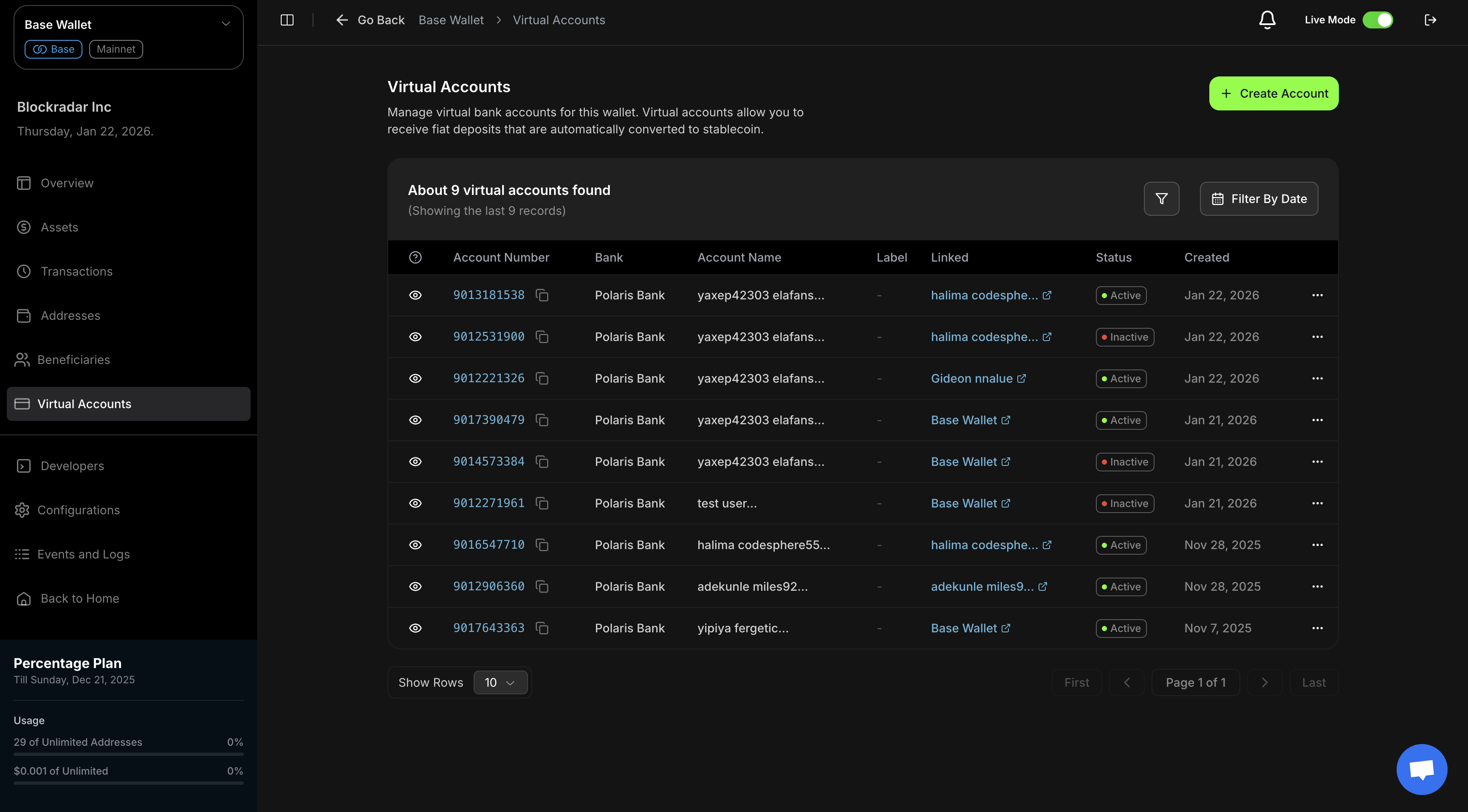
Virtual Accounts allow your customers to receive fiat payments through traditional bank transfers, which are automatically converted to stablecoins on the blockchain. You can create multiple virtual accounts per wallet or address, with support for pagination and account regeneration.
 ## Prerequisites
Before using the Virtual Accounts API, ensure you have:
Get your API key from the [Blockradar Dashboard](https://dashboard.blockradar.co). Navigate to **Developers** to generate one.
Create a wallet via the [Create Wallet API](/en/api-reference/wallets/create-wallet) or dashboard. You'll need the `walletId` for virtual account operations.
Complete the [Due Diligence Form](https://airtable.com/appsn5KFgmZhzQ9lh/pag8ytSkiF9k5w590/form) (see [Compliance Requirements](#compliance-requirements) below).
Request virtual accounts feature activation after compliance approval. Contact [support@blockradar.co](mailto:support@blockradar.co) or use live chat on the dashboard.
Virtual accounts are only available on **MAINNET**. Testnet environments do not support virtual account operations.
Depositing Fiat and converting it to a stablecoin is a paid feature. Ensure your account plan includes stablecoin access. Upgrade from **Dashboard → Settings → Subscription**.
## How It Works
Create virtual accounts linked to master wallets or child addresses with
customer information.
Customers send fiat payments to the virtual account using traditional bank
transfers.
Payments automatically trigger minting of the equivalent stablecoin amount.
Minted stablecoins are transferred to the linked wallet or address for
immediate use.
## Auto-Funding Flow
All virtual accounts use `AUTO_FUNDING`, which automatically converts fiat to stablecoin. When a customer sends fiat currency to a virtual account:
### **1. Payment Receipt**
The payment is received in the virtual account through traditional bank transfer. A `deposit.processing` webhook is triggered at this stage.
### **2. Automatic Minting**
The system automatically mints the stablecoin equivalent on the blockchain.
### **3. Blockchain Transfer**
The minted stablecoin is transferred to the virtual account's linked wallet or address. A `deposit.success` webhook is triggered upon successful completion.
## Compliance Requirements
Before accessing virtual accounts, complete the compliance onboarding process.
### **Required Documents**
* Certificate of Incorporation
* ID for Directors/Shareholders
* KYC Policy Document
### **Submit Application**
Complete the [Due Diligence Form](https://airtable.com/appsn5KFgmZhzQ9lh/pag8ytSkiF9k5w590/form) with your company details, compliance information, and document uploads.
## Supported Currency
* **Fiat**: NGN (Nigerian Naira) - Traditional bank transfers
* **Stablecoin**: cNGN - Minted automatically on blockchain
## API Endpoints
Below are the core API endpoints for Virtual Accounts operations:
### **Master Wallet Endpoints**
* [POST /wallets/{walletId}/virtual-accounts](/en/api-reference/virtual-accounts/master-wallet-create) – Create a virtual account for a master wallet
* [GET /wallets/{walletId}/virtual-accounts](/en/api-reference/virtual-accounts/master-wallet-get-all) – List all virtual accounts (paginated)
* [GET /wallets/{walletId}/virtual-accounts/{virtualAccountId}](/en/api-reference/virtual-accounts/master-wallet-get-one) – Retrieve a specific virtual account
* [GET /wallets/{walletId}/virtual-accounts/{virtualAccountId}/transactions](/en/api-reference/virtual-accounts/master-wallet-transactions) – Get transactions for a virtual account
* [PATCH /wallets/{walletId}/virtual-accounts/{virtualAccountId}](/en/api-reference/virtual-accounts/master-wallet-update) – Update virtual account status
* [POST /wallets/{walletId}/virtual-accounts/{virtualAccountId}/regenerate](/en/api-reference/virtual-accounts/master-wallet-regenerate) – Regenerate a virtual account
### **Child Address Endpoints**
* [POST /wallets/{walletId}/addresses/{addressId}/virtual-accounts](/en/api-reference/virtual-accounts/child-address-create) – Create a virtual account for a child address
* [GET /wallets/{walletId}/addresses/{addressId}/virtual-accounts](/en/api-reference/virtual-accounts/child-address-get-all) – List all virtual accounts (paginated)
* [GET /wallets/{walletId}/addresses/{addressId}/virtual-accounts/{virtualAccountId}](/en/api-reference/virtual-accounts/child-address-get-one) – Retrieve a specific virtual account
* [GET /wallets/{walletId}/addresses/{addressId}/virtual-accounts/{virtualAccountId}/transactions](/en/api-reference/virtual-accounts/child-address-transactions) – Get transactions for a virtual account
* [PATCH /wallets/{walletId}/addresses/{addressId}/virtual-accounts/{virtualAccountId}](/en/api-reference/virtual-accounts/child-address-update) – Update virtual account status
* [POST /wallets/{walletId}/addresses/{addressId}/virtual-accounts/{virtualAccountId}/regenerate](/en/api-reference/virtual-accounts/child-address-regenerate) – Regenerate a virtual account
## Creating Virtual Accounts
You can create virtual accounts for both master wallets and child addresses, depending on your use case. Use the [Create Virtual Account API](/en/api-reference/virtual-accounts/master-wallet-create) for master wallets or the [Create Virtual Account API for child addresses](/en/api-reference/virtual-accounts/child-address-create).
### **Master Wallet Request Parameters**
| Parameter | Type | Required | Description |
| ------------- | ------ | -------- | ------------------------------------------------------ |
| `firstname` | string | Yes | Customer's first name (max 29 characters) |
| `lastname` | string | Yes | Customer's last name (max 29 characters) |
| `email` | string | Yes | Customer's email address (must be unique per business) |
| `phone` | string | No | Customer's phone number in format: +234XXXXXXXXXX |
| `bvn` | string | Yes | Customer's Bank Verification Number |
| `dateOfBirth` | string | Yes | Customer's date of birth in `yyyy-MM-dd` format |
### **Master Wallet Request Example**
```json theme={null}
{
"firstname": "John",
"lastname": "Doe",
"email": "john.doe@example.com",
"phone": "+2348161846125",
"bvn": "22345678901",
"dateOfBirth": "1992-08-14"
}
```
### **Child Address Request Parameters**
| Parameter | Type | Required | Description |
| ------------- | ------ | -------- | ------------------------------------------------------ |
| `firstname` | string | Yes | Customer's first name (max 29 characters) |
| `lastname` | string | Yes | Customer's last name (max 29 characters) |
| `email` | string | Yes | Customer's email address (must be unique per business) |
| `phone` | string | No | Customer's phone number in format: +234XXXXXXXXXX |
| `bvn` | string | Yes | Customer's Bank Verification Number |
| `dateOfBirth` | string | Yes | Customer's date of birth in `yyyy-MM-dd` format |
### **Child Address Request Example**
```json theme={null}
{
"firstname": "John",
"lastname": "Doe",
"email": "john.doe@example.com",
"phone": "+2348161846125",
"bvn": "22345678901",
"dateOfBirth": "1992-08-14"
}
```
### **Response Example**
```json theme={null}
{
"data": {
"id": "8180309e-1ead-4a72-a013-b5674600ce4c",
"accountName": "John Doe",
"accountNumber": "9018927611",
"bankName": "Polaris Bank",
"bankCode": "076",
"currency": "NGN",
"type": "AUTO_FUNDING",
"isActive": true,
"status": "ACTIVE",
"reference": "20",
"customer": {
"id": "caa17eb8-4da8-45b4-a866-81dd0a1df613",
"name": "John Doe",
"email": "john.doe@example.com",
"phone": "+2348161846125",
"status": "ACTIVE",
"network": "mainnet"
},
"wallet": {
"id": "35e964a6-436a-424f-bf3a-618cc060feea",
"name": "Base Wallet",
"address": "0xD8582C57E56Ef45f9fe82870aDF63d9baB89e1F7"
},
"createdAt": "2025-11-06T18:30:34.286Z",
"updatedAt": "2025-11-06T18:30:34.286Z"
},
"message": "Virtual account created successfully",
"statusCode": 201
}
```
## Multiple Virtual Accounts
You can create multiple virtual accounts per wallet or child address. This is useful when:
* A customer needs separate accounts for different purposes (e.g., savings, payments)
* You want to track payments from different sources separately
* A customer's existing virtual account needs to be replaced while maintaining history
## Listing Virtual Accounts
The list endpoint returns a paginated list of all virtual accounts. Use query parameters to filter and paginate results.
### **Query Parameters**
| Parameter | Type | Description |
| ---------- | ------- | ------------------------------------------- |
| `page` | number | Page number (default: 1) |
| `limit` | number | Results per page (default: 10) |
| `isActive` | boolean | Filter by active status (`true` or `false`) |
### **Response Example**
```json theme={null}
{
"message": "Virtual accounts retrieved successfully",
"statusCode": 200,
"data": [
{
"id": "597ef702-f096-4f8a-a542-29e8757ba208",
"reference": "172",
"accountNumber": "9012271961",
"accountName": "John Doe",
"bankName": "Polaris Bank",
"bankCode": "076",
"currency": "NGN",
"isActive": true,
"status": "ACTIVE",
"type": "AUTO_FUNDING",
"createdAt": "2025-01-21T22:15:55.746Z",
"updatedAt": "2025-01-21T22:15:55.746Z",
"customer": {
"id": "3082e278-557a-44f0-9205-c2639560cd5a",
"name": "John Doe",
"email": "john.doe@example.com",
"phone": "+2346112768485",
"status": "ACTIVE",
"network": "mainnet"
},
"wallet": {
"id": "35e964a6-436a-424f-bf3a-618cc060feea",
"name": "Base Wallet",
"address": "0xD8582C57E56Ef45f9fe82870aDF63d9baB89e1F7"
},
"address": null
}
],
"meta": {
"totalItems": 4,
"itemCount": 4,
"itemsPerPage": 10,
"totalPages": 1,
"currentPage": 1
}
}
```
## Retrieving a Single Virtual Account
To retrieve a specific virtual account by ID, use the [Get Virtual Account API for master wallets](/en/api-reference/virtual-accounts/master-wallet-get-one) or the [Get Virtual Account API for child addresses](/en/api-reference/virtual-accounts/child-address-get-one).
### **Response Example**
```json theme={null}
{
"message": "Virtual account retrieved successfully",
"statusCode": 200,
"data": {
"id": "597ef702-f096-4f8a-a542-29e8757ba208",
"reference": "172",
"accountNumber": "9012271961",
"accountName": "John Doe",
"bankName": "Polaris Bank",
"bankCode": "076",
"currency": "NGN",
"isActive": true,
"status": "ACTIVE",
"type": "AUTO_FUNDING",
"createdAt": "2025-01-21T22:15:55.746Z",
"updatedAt": "2025-01-21T22:15:55.746Z",
"customer": {
"id": "3082e278-557a-44f0-9205-c2639560cd5a",
"name": "John Doe",
"email": "john.doe@example.com",
"phone": "+2348161846125",
"status": "ACTIVE",
"network": "mainnet"
},
"wallet": {
"id": "35e964a6-436a-424f-bf3a-618cc060feea",
"name": "Base Wallet",
"address": "0xD8582C57E56Ef45f9fe82870aDF63d9baB89e1F7"
},
"address": null
}
}
```
## Virtual Account Transactions
You can retrieve all transactions associated with a specific virtual account using the transactions endpoint.
### **Query Parameters**
| Parameter | Type | Description |
| --------- | ------ | ------------------------------ |
| `page` | number | Page number (default: 1) |
| `limit` | number | Results per page (default: 10) |
### **Response Example**
```json theme={null}
{
"message": "Virtual account transactions retrieved successfully",
"statusCode": 200,
"data": [
{
"id": "ad3ce9a3-3e1c-43dc-bb7f-2c570fc7bfdc",
"reference": "auto-funding-09026725110701402449700167083590131815",
"senderAddress": "0xD2b6be31932E0294F2ebD14a008C3f1E05B47BC4",
"recipientAddress": "0xbaD4E4B5e6660AcD138F776a992b566e8Bf3bb15",
"amount": "50.0",
"amountPaid": "50.0",
"amountUSD": "0.03382",
"currency": "NGN",
"status": "SUCCESS",
"type": "DEPOSIT",
"note": "Auto funding of 50.0 cNGN to 0xbaD4E4B5e6660AcD138F776a992b566e8Bf3bb15",
"network": "mainnet",
"metadata": {
"autoFunding": {
"narration": "NIBSS:9018927611:SULEIMAN, ABDULFATAI:Sending:090267251107014024497001670835",
"sessionId": "09026725110701402449700167083590131815",
"senderBankName": "KUDA MFB",
"senderAccountName": "SULEIMAN, ABDULFATAI"
}
},
"createdAt": "2025-01-22T22:29:28.679Z",
"asset": {
"name": "cNGN",
"symbol": "cNGN",
"currency": "NGN"
},
"blockchain": {
"name": "base",
"slug": "base"
}
}
],
"meta": {
"totalItems": 1,
"itemCount": 1,
"itemsPerPage": 10,
"totalPages": 1,
"currentPage": 1
}
}
```
The `metadata.autoFunding` field contains details about the fiat payment source, including the sender's bank name, account name, and transaction narration from the bank transfer.
## Regenerating Virtual Accounts
The regenerate endpoint allows you to create a new virtual account for a customer while deactivating their existing one. This is useful when:
* A customer's bank account details need to change
* The virtual account has been compromised
* You need to migrate a customer to a different bank
### **Regenerate Parameters**
| Parameter | Type | Required | Description |
| ----------- | ------ | -------- | ------------------------------------------------- |
| `firstname` | string | Yes | Customer's first name (max 29 characters) |
| `lastname` | string | Yes | Customer's last name (max 29 characters) |
| `email` | string | Yes | Customer's email address |
| `phone` | string | No | Customer's phone number in format: +234XXXXXXXXXX |
| `reason` | string | Yes | Reason for regenerating the virtual account |
### **Request Example**
```json theme={null}
{
"firstname": "John",
"lastname": "Doe",
"email": "john.doe@example.com",
"phone": "+2348161846125",
"reason": "Customer requested new account number"
}
```
The regenerate operation will deactivate the existing virtual account and create a new one. The original account's transaction history is preserved and can still be queried.
## Updating Virtual Accounts
You can activate or deactivate virtual accounts to control auto-funding behavior. Use the [Update Virtual Account API for master wallets](/en/api-reference/virtual-accounts/master-wallet-update) or the [Update Virtual Account API for child addresses](/en/api-reference/virtual-accounts/child-address-update).
### **Auto-Funding Behavior**
* **Active accounts**: Payments received trigger automatic stablecoin minting
* **Inactive accounts**: Payments are received but auto-funding is disabled
### **Update Parameters**
| Parameter | Type | Required | Description |
| ---------- | ------- | -------- | ----------------------------------------- |
| `isActive` | boolean | Yes | `true` to activate, `false` to deactivate |
### **Request Example**
```json theme={null}
{
"isActive": false
}
```
### **Response Example**
```json theme={null}
{
"message": "Virtual account updated successfully",
"statusCode": 200,
"data": {
"id": "597ef702-f096-4f8a-a542-29e8757ba208",
"accountNumber": "9012271961",
"accountName": "John Doe",
"bankName": "Polaris Bank",
"isActive": false,
"status": "INACTIVE",
"type": "AUTO_FUNDING"
}
}
```
When a virtual account is deactivated (`isActive: false`), payments can still
be received but the automatic stablecoin minting and transfer process is
disabled. You can reactivate the account at any time to re-enable
auto-funding.
## Webhooks
Virtual accounts trigger webhook events when payments are received and processed. For `AUTO_FUNDING` type accounts, you'll receive webhook notifications at each stage of the payment processing flow.
### **Webhook Events**
When a customer sends fiat payment to a virtual account:
1. **`deposit.processing`** - Triggered immediately when the fiat payment is received in the virtual account. This indicates that the payment has been detected and the minting process is about to begin.
2. **`deposit.success`** - Triggered when the stablecoin has been successfully minted and transferred to the linked wallet or address. This confirms that the entire auto-funding process is complete.
3. **`deposit.failed`** - Triggered if the minting or transfer process fails at any point.
4. **`deposit.cancelled`** - Triggered if the transaction is cancelled before completion.
### **Webhook Payload Example**
```json theme={null}
{
"event": "deposit.success",
"data": {
"id": "ad3ce9a3-3e1c-43dc-bb7f-2c570fc7bfdc",
"reference": "auto-funding-09026725110701402449700167083590131815",
"amount": "50.0",
"currency": "NGN",
"status": "SUCCESS",
"type": "DEPOSIT",
"network": "mainnet",
"metadata": {
"autoFunding": {
"sessionId": "09026725110701402449700167083590131815",
"senderBankName": "KUDA MFB",
"senderAccountName": "SULEIMAN, ABDULFATAI"
}
},
"virtualAccount": {
"id": "597ef702-f096-4f8a-a542-29e8757ba208",
"accountNumber": "9012271961",
"bankName": "Polaris Bank"
},
"wallet": {
"id": "35e964a6-436a-424f-bf3a-618cc060feea",
"name": "Base Wallet"
}
}
}
```
Webhooks are only triggered for active virtual accounts (`isActive: true`). If
an account is deactivated, payments may still be received but webhook events
will not be sent until the account is reactivated.
For more information about webhook setup, payload structure, and event handling, see the [Webhooks documentation](/en/essentials/webhooks).
## Use Cases
### **E-commerce Payments**
Create virtual accounts for customers to receive payments for products or services. The automatic conversion to stablecoins enables seamless integration with your blockchain-based payment system.
### **Subscription Services**
Link virtual accounts to customer subscriptions, allowing recurring payments through traditional bank transfers that are automatically converted to stablecoins.
### **Marketplace Transactions**
Enable peer-to-peer transactions where customers can send fiat payments that are instantly converted to stablecoins and credited to their wallet.
### **Remittance Services**
Provide customers with virtual accounts to receive remittances in NGN, which are automatically converted to stablecoins for easy cross-border transfers.
## What's Next
Once cNGN is in your wallet:
* **[Swap](/en/essentials/swap)** - Convert cNGN to USDT, USDC, or other stablecoins on-demand
* **[Auto-Settlement](/en/essentials/auto-settlements)** - Automatically convert cNGN to USDT/USDC on every deposit
## Best Practices
### **Account Management**
* **Use the same create payload across both routes**: Master wallet and child address virtual account creation both use customer details (`firstname`, `lastname`, `email`, `phone`, `bvn`, `dateOfBirth`)
* **Phone number format**: For virtual account creation, always use the correct format (`+234XXXXXXXXXX`) for Nigerian phone numbers
* **Account activation**: Activate accounts only when ready to process payments
* **Monitor account status**: Regularly check account status and handle inactive accounts appropriately
* **Document regeneration reasons**: Always provide clear reasons when regenerating accounts for audit purposes
### **Multiple Accounts**
* **Plan your account structure**: Decide upfront how many accounts each customer may need
* **Track account history**: When regenerating, maintain references to previous account IDs for transaction reconciliation
### **Security**
* **Customer verification**: Verify customer information before creating virtual accounts
* **Account validation**: Validate account details before processing payments
* **Access control**: Implement proper access controls for virtual account management
## Error Handling
The API returns standard HTTP status codes and error responses. Common errors include:
| Status Code | Error | Description |
| ----------- | -------------------- | ------------------------------------------------------------------------------------ |
| `400` | Bad Request | Invalid request parameters (e.g., invalid phone format or malformed account details) |
| `401` | Unauthorized | Missing or invalid API key |
| `404` | Not Found | Virtual account or wallet not found |
| `422` | Unprocessable Entity | Validation failed (e.g., missing required fields) |
### **Error Response Example**
```json theme={null}
{
"message": "Validation failed",
"statusCode": 422,
"error": "Unprocessable Entity"
}
```
## Support
* **Email**: [support@blockradar.co](mailto:support@blockradar.co)
* **Live chat**: Available on the dashboard
* **API Reference**: [Virtual Accounts API](/en/api-reference/virtual-accounts/master-wallet-get-all)
Need support for additional stablecoins or currencies? Contact [support@blockradar.co](mailto:support@blockradar.co).
## Prerequisites
Before using the Virtual Accounts API, ensure you have:
Get your API key from the [Blockradar Dashboard](https://dashboard.blockradar.co). Navigate to **Developers** to generate one.
Create a wallet via the [Create Wallet API](/en/api-reference/wallets/create-wallet) or dashboard. You'll need the `walletId` for virtual account operations.
Complete the [Due Diligence Form](https://airtable.com/appsn5KFgmZhzQ9lh/pag8ytSkiF9k5w590/form) (see [Compliance Requirements](#compliance-requirements) below).
Request virtual accounts feature activation after compliance approval. Contact [support@blockradar.co](mailto:support@blockradar.co) or use live chat on the dashboard.
Virtual accounts are only available on **MAINNET**. Testnet environments do not support virtual account operations.
Depositing Fiat and converting it to a stablecoin is a paid feature. Ensure your account plan includes stablecoin access. Upgrade from **Dashboard → Settings → Subscription**.
## How It Works
Create virtual accounts linked to master wallets or child addresses with
customer information.
Customers send fiat payments to the virtual account using traditional bank
transfers.
Payments automatically trigger minting of the equivalent stablecoin amount.
Minted stablecoins are transferred to the linked wallet or address for
immediate use.
## Auto-Funding Flow
All virtual accounts use `AUTO_FUNDING`, which automatically converts fiat to stablecoin. When a customer sends fiat currency to a virtual account:
### **1. Payment Receipt**
The payment is received in the virtual account through traditional bank transfer. A `deposit.processing` webhook is triggered at this stage.
### **2. Automatic Minting**
The system automatically mints the stablecoin equivalent on the blockchain.
### **3. Blockchain Transfer**
The minted stablecoin is transferred to the virtual account's linked wallet or address. A `deposit.success` webhook is triggered upon successful completion.
## Compliance Requirements
Before accessing virtual accounts, complete the compliance onboarding process.
### **Required Documents**
* Certificate of Incorporation
* ID for Directors/Shareholders
* KYC Policy Document
### **Submit Application**
Complete the [Due Diligence Form](https://airtable.com/appsn5KFgmZhzQ9lh/pag8ytSkiF9k5w590/form) with your company details, compliance information, and document uploads.
## Supported Currency
* **Fiat**: NGN (Nigerian Naira) - Traditional bank transfers
* **Stablecoin**: cNGN - Minted automatically on blockchain
## API Endpoints
Below are the core API endpoints for Virtual Accounts operations:
### **Master Wallet Endpoints**
* [POST /wallets/{walletId}/virtual-accounts](/en/api-reference/virtual-accounts/master-wallet-create) – Create a virtual account for a master wallet
* [GET /wallets/{walletId}/virtual-accounts](/en/api-reference/virtual-accounts/master-wallet-get-all) – List all virtual accounts (paginated)
* [GET /wallets/{walletId}/virtual-accounts/{virtualAccountId}](/en/api-reference/virtual-accounts/master-wallet-get-one) – Retrieve a specific virtual account
* [GET /wallets/{walletId}/virtual-accounts/{virtualAccountId}/transactions](/en/api-reference/virtual-accounts/master-wallet-transactions) – Get transactions for a virtual account
* [PATCH /wallets/{walletId}/virtual-accounts/{virtualAccountId}](/en/api-reference/virtual-accounts/master-wallet-update) – Update virtual account status
* [POST /wallets/{walletId}/virtual-accounts/{virtualAccountId}/regenerate](/en/api-reference/virtual-accounts/master-wallet-regenerate) – Regenerate a virtual account
### **Child Address Endpoints**
* [POST /wallets/{walletId}/addresses/{addressId}/virtual-accounts](/en/api-reference/virtual-accounts/child-address-create) – Create a virtual account for a child address
* [GET /wallets/{walletId}/addresses/{addressId}/virtual-accounts](/en/api-reference/virtual-accounts/child-address-get-all) – List all virtual accounts (paginated)
* [GET /wallets/{walletId}/addresses/{addressId}/virtual-accounts/{virtualAccountId}](/en/api-reference/virtual-accounts/child-address-get-one) – Retrieve a specific virtual account
* [GET /wallets/{walletId}/addresses/{addressId}/virtual-accounts/{virtualAccountId}/transactions](/en/api-reference/virtual-accounts/child-address-transactions) – Get transactions for a virtual account
* [PATCH /wallets/{walletId}/addresses/{addressId}/virtual-accounts/{virtualAccountId}](/en/api-reference/virtual-accounts/child-address-update) – Update virtual account status
* [POST /wallets/{walletId}/addresses/{addressId}/virtual-accounts/{virtualAccountId}/regenerate](/en/api-reference/virtual-accounts/child-address-regenerate) – Regenerate a virtual account
## Creating Virtual Accounts
You can create virtual accounts for both master wallets and child addresses, depending on your use case. Use the [Create Virtual Account API](/en/api-reference/virtual-accounts/master-wallet-create) for master wallets or the [Create Virtual Account API for child addresses](/en/api-reference/virtual-accounts/child-address-create).
### **Master Wallet Request Parameters**
| Parameter | Type | Required | Description |
| ------------- | ------ | -------- | ------------------------------------------------------ |
| `firstname` | string | Yes | Customer's first name (max 29 characters) |
| `lastname` | string | Yes | Customer's last name (max 29 characters) |
| `email` | string | Yes | Customer's email address (must be unique per business) |
| `phone` | string | No | Customer's phone number in format: +234XXXXXXXXXX |
| `bvn` | string | Yes | Customer's Bank Verification Number |
| `dateOfBirth` | string | Yes | Customer's date of birth in `yyyy-MM-dd` format |
### **Master Wallet Request Example**
```json theme={null}
{
"firstname": "John",
"lastname": "Doe",
"email": "john.doe@example.com",
"phone": "+2348161846125",
"bvn": "22345678901",
"dateOfBirth": "1992-08-14"
}
```
### **Child Address Request Parameters**
| Parameter | Type | Required | Description |
| ------------- | ------ | -------- | ------------------------------------------------------ |
| `firstname` | string | Yes | Customer's first name (max 29 characters) |
| `lastname` | string | Yes | Customer's last name (max 29 characters) |
| `email` | string | Yes | Customer's email address (must be unique per business) |
| `phone` | string | No | Customer's phone number in format: +234XXXXXXXXXX |
| `bvn` | string | Yes | Customer's Bank Verification Number |
| `dateOfBirth` | string | Yes | Customer's date of birth in `yyyy-MM-dd` format |
### **Child Address Request Example**
```json theme={null}
{
"firstname": "John",
"lastname": "Doe",
"email": "john.doe@example.com",
"phone": "+2348161846125",
"bvn": "22345678901",
"dateOfBirth": "1992-08-14"
}
```
### **Response Example**
```json theme={null}
{
"data": {
"id": "8180309e-1ead-4a72-a013-b5674600ce4c",
"accountName": "John Doe",
"accountNumber": "9018927611",
"bankName": "Polaris Bank",
"bankCode": "076",
"currency": "NGN",
"type": "AUTO_FUNDING",
"isActive": true,
"status": "ACTIVE",
"reference": "20",
"customer": {
"id": "caa17eb8-4da8-45b4-a866-81dd0a1df613",
"name": "John Doe",
"email": "john.doe@example.com",
"phone": "+2348161846125",
"status": "ACTIVE",
"network": "mainnet"
},
"wallet": {
"id": "35e964a6-436a-424f-bf3a-618cc060feea",
"name": "Base Wallet",
"address": "0xD8582C57E56Ef45f9fe82870aDF63d9baB89e1F7"
},
"createdAt": "2025-11-06T18:30:34.286Z",
"updatedAt": "2025-11-06T18:30:34.286Z"
},
"message": "Virtual account created successfully",
"statusCode": 201
}
```
## Multiple Virtual Accounts
You can create multiple virtual accounts per wallet or child address. This is useful when:
* A customer needs separate accounts for different purposes (e.g., savings, payments)
* You want to track payments from different sources separately
* A customer's existing virtual account needs to be replaced while maintaining history
## Listing Virtual Accounts
The list endpoint returns a paginated list of all virtual accounts. Use query parameters to filter and paginate results.
### **Query Parameters**
| Parameter | Type | Description |
| ---------- | ------- | ------------------------------------------- |
| `page` | number | Page number (default: 1) |
| `limit` | number | Results per page (default: 10) |
| `isActive` | boolean | Filter by active status (`true` or `false`) |
### **Response Example**
```json theme={null}
{
"message": "Virtual accounts retrieved successfully",
"statusCode": 200,
"data": [
{
"id": "597ef702-f096-4f8a-a542-29e8757ba208",
"reference": "172",
"accountNumber": "9012271961",
"accountName": "John Doe",
"bankName": "Polaris Bank",
"bankCode": "076",
"currency": "NGN",
"isActive": true,
"status": "ACTIVE",
"type": "AUTO_FUNDING",
"createdAt": "2025-01-21T22:15:55.746Z",
"updatedAt": "2025-01-21T22:15:55.746Z",
"customer": {
"id": "3082e278-557a-44f0-9205-c2639560cd5a",
"name": "John Doe",
"email": "john.doe@example.com",
"phone": "+2346112768485",
"status": "ACTIVE",
"network": "mainnet"
},
"wallet": {
"id": "35e964a6-436a-424f-bf3a-618cc060feea",
"name": "Base Wallet",
"address": "0xD8582C57E56Ef45f9fe82870aDF63d9baB89e1F7"
},
"address": null
}
],
"meta": {
"totalItems": 4,
"itemCount": 4,
"itemsPerPage": 10,
"totalPages": 1,
"currentPage": 1
}
}
```
## Retrieving a Single Virtual Account
To retrieve a specific virtual account by ID, use the [Get Virtual Account API for master wallets](/en/api-reference/virtual-accounts/master-wallet-get-one) or the [Get Virtual Account API for child addresses](/en/api-reference/virtual-accounts/child-address-get-one).
### **Response Example**
```json theme={null}
{
"message": "Virtual account retrieved successfully",
"statusCode": 200,
"data": {
"id": "597ef702-f096-4f8a-a542-29e8757ba208",
"reference": "172",
"accountNumber": "9012271961",
"accountName": "John Doe",
"bankName": "Polaris Bank",
"bankCode": "076",
"currency": "NGN",
"isActive": true,
"status": "ACTIVE",
"type": "AUTO_FUNDING",
"createdAt": "2025-01-21T22:15:55.746Z",
"updatedAt": "2025-01-21T22:15:55.746Z",
"customer": {
"id": "3082e278-557a-44f0-9205-c2639560cd5a",
"name": "John Doe",
"email": "john.doe@example.com",
"phone": "+2348161846125",
"status": "ACTIVE",
"network": "mainnet"
},
"wallet": {
"id": "35e964a6-436a-424f-bf3a-618cc060feea",
"name": "Base Wallet",
"address": "0xD8582C57E56Ef45f9fe82870aDF63d9baB89e1F7"
},
"address": null
}
}
```
## Virtual Account Transactions
You can retrieve all transactions associated with a specific virtual account using the transactions endpoint.
### **Query Parameters**
| Parameter | Type | Description |
| --------- | ------ | ------------------------------ |
| `page` | number | Page number (default: 1) |
| `limit` | number | Results per page (default: 10) |
### **Response Example**
```json theme={null}
{
"message": "Virtual account transactions retrieved successfully",
"statusCode": 200,
"data": [
{
"id": "ad3ce9a3-3e1c-43dc-bb7f-2c570fc7bfdc",
"reference": "auto-funding-09026725110701402449700167083590131815",
"senderAddress": "0xD2b6be31932E0294F2ebD14a008C3f1E05B47BC4",
"recipientAddress": "0xbaD4E4B5e6660AcD138F776a992b566e8Bf3bb15",
"amount": "50.0",
"amountPaid": "50.0",
"amountUSD": "0.03382",
"currency": "NGN",
"status": "SUCCESS",
"type": "DEPOSIT",
"note": "Auto funding of 50.0 cNGN to 0xbaD4E4B5e6660AcD138F776a992b566e8Bf3bb15",
"network": "mainnet",
"metadata": {
"autoFunding": {
"narration": "NIBSS:9018927611:SULEIMAN, ABDULFATAI:Sending:090267251107014024497001670835",
"sessionId": "09026725110701402449700167083590131815",
"senderBankName": "KUDA MFB",
"senderAccountName": "SULEIMAN, ABDULFATAI"
}
},
"createdAt": "2025-01-22T22:29:28.679Z",
"asset": {
"name": "cNGN",
"symbol": "cNGN",
"currency": "NGN"
},
"blockchain": {
"name": "base",
"slug": "base"
}
}
],
"meta": {
"totalItems": 1,
"itemCount": 1,
"itemsPerPage": 10,
"totalPages": 1,
"currentPage": 1
}
}
```
The `metadata.autoFunding` field contains details about the fiat payment source, including the sender's bank name, account name, and transaction narration from the bank transfer.
## Regenerating Virtual Accounts
The regenerate endpoint allows you to create a new virtual account for a customer while deactivating their existing one. This is useful when:
* A customer's bank account details need to change
* The virtual account has been compromised
* You need to migrate a customer to a different bank
### **Regenerate Parameters**
| Parameter | Type | Required | Description |
| ----------- | ------ | -------- | ------------------------------------------------- |
| `firstname` | string | Yes | Customer's first name (max 29 characters) |
| `lastname` | string | Yes | Customer's last name (max 29 characters) |
| `email` | string | Yes | Customer's email address |
| `phone` | string | No | Customer's phone number in format: +234XXXXXXXXXX |
| `reason` | string | Yes | Reason for regenerating the virtual account |
### **Request Example**
```json theme={null}
{
"firstname": "John",
"lastname": "Doe",
"email": "john.doe@example.com",
"phone": "+2348161846125",
"reason": "Customer requested new account number"
}
```
The regenerate operation will deactivate the existing virtual account and create a new one. The original account's transaction history is preserved and can still be queried.
## Updating Virtual Accounts
You can activate or deactivate virtual accounts to control auto-funding behavior. Use the [Update Virtual Account API for master wallets](/en/api-reference/virtual-accounts/master-wallet-update) or the [Update Virtual Account API for child addresses](/en/api-reference/virtual-accounts/child-address-update).
### **Auto-Funding Behavior**
* **Active accounts**: Payments received trigger automatic stablecoin minting
* **Inactive accounts**: Payments are received but auto-funding is disabled
### **Update Parameters**
| Parameter | Type | Required | Description |
| ---------- | ------- | -------- | ----------------------------------------- |
| `isActive` | boolean | Yes | `true` to activate, `false` to deactivate |
### **Request Example**
```json theme={null}
{
"isActive": false
}
```
### **Response Example**
```json theme={null}
{
"message": "Virtual account updated successfully",
"statusCode": 200,
"data": {
"id": "597ef702-f096-4f8a-a542-29e8757ba208",
"accountNumber": "9012271961",
"accountName": "John Doe",
"bankName": "Polaris Bank",
"isActive": false,
"status": "INACTIVE",
"type": "AUTO_FUNDING"
}
}
```
When a virtual account is deactivated (`isActive: false`), payments can still
be received but the automatic stablecoin minting and transfer process is
disabled. You can reactivate the account at any time to re-enable
auto-funding.
## Webhooks
Virtual accounts trigger webhook events when payments are received and processed. For `AUTO_FUNDING` type accounts, you'll receive webhook notifications at each stage of the payment processing flow.
### **Webhook Events**
When a customer sends fiat payment to a virtual account:
1. **`deposit.processing`** - Triggered immediately when the fiat payment is received in the virtual account. This indicates that the payment has been detected and the minting process is about to begin.
2. **`deposit.success`** - Triggered when the stablecoin has been successfully minted and transferred to the linked wallet or address. This confirms that the entire auto-funding process is complete.
3. **`deposit.failed`** - Triggered if the minting or transfer process fails at any point.
4. **`deposit.cancelled`** - Triggered if the transaction is cancelled before completion.
### **Webhook Payload Example**
```json theme={null}
{
"event": "deposit.success",
"data": {
"id": "ad3ce9a3-3e1c-43dc-bb7f-2c570fc7bfdc",
"reference": "auto-funding-09026725110701402449700167083590131815",
"amount": "50.0",
"currency": "NGN",
"status": "SUCCESS",
"type": "DEPOSIT",
"network": "mainnet",
"metadata": {
"autoFunding": {
"sessionId": "09026725110701402449700167083590131815",
"senderBankName": "KUDA MFB",
"senderAccountName": "SULEIMAN, ABDULFATAI"
}
},
"virtualAccount": {
"id": "597ef702-f096-4f8a-a542-29e8757ba208",
"accountNumber": "9012271961",
"bankName": "Polaris Bank"
},
"wallet": {
"id": "35e964a6-436a-424f-bf3a-618cc060feea",
"name": "Base Wallet"
}
}
}
```
Webhooks are only triggered for active virtual accounts (`isActive: true`). If
an account is deactivated, payments may still be received but webhook events
will not be sent until the account is reactivated.
For more information about webhook setup, payload structure, and event handling, see the [Webhooks documentation](/en/essentials/webhooks).
## Use Cases
### **E-commerce Payments**
Create virtual accounts for customers to receive payments for products or services. The automatic conversion to stablecoins enables seamless integration with your blockchain-based payment system.
### **Subscription Services**
Link virtual accounts to customer subscriptions, allowing recurring payments through traditional bank transfers that are automatically converted to stablecoins.
### **Marketplace Transactions**
Enable peer-to-peer transactions where customers can send fiat payments that are instantly converted to stablecoins and credited to their wallet.
### **Remittance Services**
Provide customers with virtual accounts to receive remittances in NGN, which are automatically converted to stablecoins for easy cross-border transfers.
## What's Next
Once cNGN is in your wallet:
* **[Swap](/en/essentials/swap)** - Convert cNGN to USDT, USDC, or other stablecoins on-demand
* **[Auto-Settlement](/en/essentials/auto-settlements)** - Automatically convert cNGN to USDT/USDC on every deposit
## Best Practices
### **Account Management**
* **Use the same create payload across both routes**: Master wallet and child address virtual account creation both use customer details (`firstname`, `lastname`, `email`, `phone`, `bvn`, `dateOfBirth`)
* **Phone number format**: For virtual account creation, always use the correct format (`+234XXXXXXXXXX`) for Nigerian phone numbers
* **Account activation**: Activate accounts only when ready to process payments
* **Monitor account status**: Regularly check account status and handle inactive accounts appropriately
* **Document regeneration reasons**: Always provide clear reasons when regenerating accounts for audit purposes
### **Multiple Accounts**
* **Plan your account structure**: Decide upfront how many accounts each customer may need
* **Track account history**: When regenerating, maintain references to previous account IDs for transaction reconciliation
### **Security**
* **Customer verification**: Verify customer information before creating virtual accounts
* **Account validation**: Validate account details before processing payments
* **Access control**: Implement proper access controls for virtual account management
## Error Handling
The API returns standard HTTP status codes and error responses. Common errors include:
| Status Code | Error | Description |
| ----------- | -------------------- | ------------------------------------------------------------------------------------ |
| `400` | Bad Request | Invalid request parameters (e.g., invalid phone format or malformed account details) |
| `401` | Unauthorized | Missing or invalid API key |
| `404` | Not Found | Virtual account or wallet not found |
| `422` | Unprocessable Entity | Validation failed (e.g., missing required fields) |
### **Error Response Example**
```json theme={null}
{
"message": "Validation failed",
"statusCode": 422,
"error": "Unprocessable Entity"
}
```
## Support
* **Email**: [support@blockradar.co](mailto:support@blockradar.co)
* **Live chat**: Available on the dashboard
* **API Reference**: [Virtual Accounts API](/en/api-reference/virtual-accounts/master-wallet-get-all)
Need support for additional stablecoins or currencies? Contact [support@blockradar.co](mailto:support@blockradar.co).