> ## Documentation Index
> Fetch the complete documentation index at: https://docs.blockradar.co/llms.txt
> Use this file to discover all available pages before exploring further.
# Withdraw Fiat
> Convert stablecoins to fiat and send to bank accounts
In a nutshell
Blockradar's Withdraw Fiat API lets you convert supported stablecoins into fiat and transfer funds to bank accounts. You can fetch supported assets, validate bank accounts, get quotes, and execute withdrawals from both master wallets and child addresses.
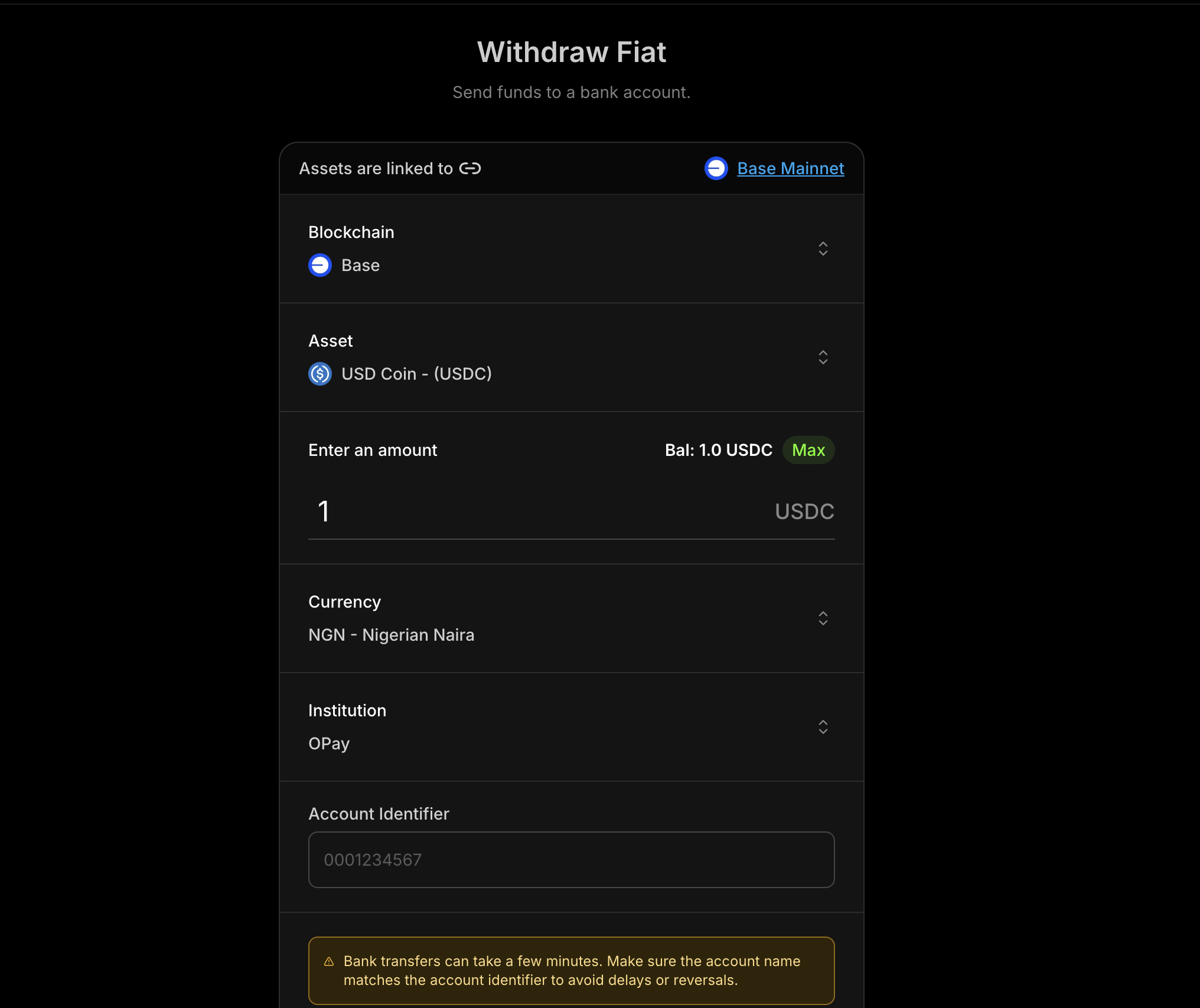 ## Prerequisites
Before using Withdraw Fiat, ensure you have:
Complete partner onboarding before requesting Withdraw Fiat access (see
[Compliance Requirements](#compliance-requirements) below).
Get your API key from the [Blockradar
Dashboard](https://dashboard.blockradar.co). Navigate to **Developers** to
generate one.
Create a wallet via the dashboard. You'll need the `walletId` for withdrawal
operations.
Fetch supported fiat assets using [Get Supported
Assets](/en/api-reference/withdraw-fiat/get-supported-assets).
Collect a valid account identifier and institution identifier (bank code).
## How It Works
Withdraw Fiat follows a simple sequence:
Fetch the assets supported for withdrawals.
Retrieve all supported currencies.
Fetch the current exchange rate for your selected asset.
Validate institution account details before initiating a withdrawal.
Estimate fees and exchange rate for the requested amount.
Submit the withdrawal for processing.
## Supported Fiat Currencies
| Currency | Code |
| ------------------ | ---- |
| Kenyan Shilling | KES |
| Nigerian Naira | NGN |
| Tanzanian Shilling | TZS |
| Ugandan Shilling | UGX |
| Brazilian Real | BRL |
| Malawian Kwacha | MWK |
## Compliance Requirements
Before accessing Withdraw Fiat, complete the applicable compliance onboarding
process for your payout currency coverage.
### **Choose Your Onboarding Path**
* **NGN (Naira) only**: Complete the [Naira-only onboarding form](https://airtable.com/appsn5KFgmZhzQ9lh/pag8ytSkiF9k5w590/form).
* **Other African currencies**: Complete the [African currencies partner onboarding](https://app.paycrest.io/partner-onboarding?referralId=blockradar).
If you need access to both NGN and other supported African currencies, complete both onboarding flows.
### **Approval Requirement**
Withdraw Fiat access is enabled after compliance review and approval for your selected onboarding path.
## Master Wallet vs Child Address
Withdraw Fiat is available at two levels:
Withdraw from the master wallet. Ideal for treasury operations.
Withdraw from a specific child address. Useful for user-specific flows.
### Endpoints
| Operation | Master Wallet | Child Address |
| -------------------------- | ---------------------------------------------------------------------------- | ------------------------------------------------------------------------- |
| Get Supported Assets | `GET /v1/wallets/{walletId}/withdraw/fiat/assets` | — |
| Get Institutions | `GET /v1/wallets/{walletId}/withdraw/fiat/institutions` | — |
| Get Exchange Rates | `GET /v1/wallets/{walletId}/withdraw/fiat/rates` | — |
| Get Currencies | `GET /v1/wallets/{walletId}/withdraw/fiat/currencies` | — |
| Verify Institution Account | `POST /v1/wallets/{walletId}/withdraw/fiat/institution-account-verification` | — |
| Get Quote | `POST /v1/wallets/{walletId}/withdraw/fiat/quote` | `POST /v1/wallets/{walletId}/addresses/{addressId}/withdraw/fiat/quote` |
| Execute | `POST /v1/wallets/{walletId}/withdraw/fiat/execute` | `POST /v1/wallets/{walletId}/addresses/{addressId}/withdraw/fiat/execute` |
## Typical Flow
1. **Fetch supported assets** to choose the stablecoin to withdraw.
2. **List institutions** and select a bank/institution identifier.
3. **Verify account** to confirm account name/details.
4. **Get quote** to show fees and rate before execution.
5. **Execute withdrawal** and track status in your system.
## Step 1: Get a Quote
Always fetch a quote before executing a withdrawal so you can display the rate and fees to the user.
### Request Parameters
| Parameter | Type | Required | Description |
| ----------------------- | ------ | -------- | --------------------------------------- |
| `assetId` | string | Yes | The stablecoin asset ID to withdraw |
| `amount` | string | Yes | Amount to withdraw in the asset's units |
| `currency` | string | Yes | Destination fiat currency (e.g., `NGN`) |
| `accountIdentifier` | string | Yes | Bank account number or identifier |
| `institutionIdentifier` | string | Yes | Bank/institution code |
### Quote Example
```bash Curl theme={null}
curl --request POST \
--url https://api.blockradar.co/v1/wallets/{walletId}/withdraw/fiat/quote \
--header 'Content-Type: application/json' \
--header 'x-api-key: ' \
--data '{
"assetId": "asset-uuid-here",
"amount": "1000",
"currency": "NGN",
"accountIdentifier": "0023103996",
"institutionIdentifier": "SBICNGLA"
}'
```
## Step 2: Execute Withdrawal
Once you accept the quote, execute the withdrawal with the same details.
### Request Parameters
| Parameter | Type | Required | Description |
| ----------------------- | ------ | -------- | ---------------------------------------------- |
| `assetId` | string | Yes | The stablecoin asset ID to withdraw |
| `amount` | string | Yes | Amount to withdraw in the asset's units |
| `currency` | string | Yes | Destination fiat currency (e.g., `NGN`) |
| `accountIdentifier` | string | Yes | Bank account number or identifier |
| `institutionIdentifier` | string | Yes | Bank/institution code |
| `reference` | string | No | Client reference for idempotency/tracking |
| `metadata` | object | No | Key-value metadata attached to the transaction |
| `note` | string | No | Human-readable note for this withdrawal |
### Execute Example
```bash Curl theme={null}
curl --request POST \
--url https://api.blockradar.co/v1/wallets/{walletId}/withdraw/fiat/execute \
--header 'Content-Type: application/json' \
--header 'x-api-key: ' \
--data '{
"assetId": "asset-uuid-here",
"amount": "1000",
"currency": "NGN",
"accountIdentifier": "8034007516",
"institutionIdentifier": "OPAYNGPC",
"reference": "WD-20260303-001",
"metadata": {
"source": "payroll",
"initiatedBy": "treasury-bot"
},
"note": "March payroll payout"
}'
```
### Execute Response
```json theme={null}
{
"status": true,
"message": "Successful",
"data": {
"id": "db53c3ef-5643-4f98-92cf-d02aef300f45",
"reference": "WD-20260303-001",
"senderAddress": "0x969838345E5cd5F755DfcADB57e72F5d23271e48",
"recipientAddress": "0x30F6A8457F8E42371E204a9c103f2Bd42341dD0F",
"tokenAddress": "0x46C85152bFe9f96829aA94755D9f915F9B10EF5F",
"amount": "1000",
"amountPaid": "1000",
"amountUSD": "0.68",
"rateUSD": "0.00068",
"fee": "2",
"currency": "NGN",
"toAmount": "1000.00",
"toCurrency": "NGN",
"status": "PENDING",
"processingStatus": "PENDING",
"processingProviderReference": null,
"processingReason": null,
"type": "OFFRAMP",
"createdChannel": "api",
"network": "mainnet",
"chainId": null,
"note": "March payroll payout",
"metadata": {
"source": "payroll",
"initiatedBy": "treasury-bot"
},
"beneficiary": {
"id": "4dd8d16e-8550-4f51-84a1-60df9c608c5d",
"name": "JOHN DOE",
"type": "FIAT",
"isActive": true,
"institutionIdentifier": "OPAYNGPC",
"institutionAccountIdentifier": "8034007516",
"currency": "NGN"
}
}
}
```
## Webhooks
Track withdrawal status with the following webhook events:
| Event | Description |
| -------------------- | --------------------------------- |
| `offramp.processing` | Withdrawal is being processed |
| `offramp.success` | Withdrawal completed successfully |
| `offramp.failed` | Withdrawal failed |
### Webhook Payload Example
```json theme={null}
{
"event": "offramp.processing",
"data": {
"id": "d2b985da-7f7e-4494-a6bc-0e675d50eed3",
"reference": "EVF2g9X70Sj4hoX3ma8l",
"senderAddress": "0x969838345E5cd5F755DfcADB57e72F5d23271e48",
"tokenAddress": "0x833589fCD6eDb6E08f4c7C32D4f71b54bdA02913",
"amount": "0.5",
"amountPaid": "0.5",
"amountUSD": "0.4998",
"rateUSD": "0.9996",
"fee": "0",
"feeUSD": null,
"currency": "USD",
"toCurrency": "NGN",
"status": "PROCESSING",
"processingStatus": "SUCCESS",
"processingProviderReference": "0x25003cb8356c92e3c296e7dd384ead681c5f57fb6182760fa4178750464ffd35",
"processingReason": null,
"type": "OFFRAMP",
"createdChannel": "api",
"network": "mainnet",
"chainId": 8453,
"metadata": null,
"toAmount": "711.21",
"rate": "1422.42",
"beneficiary": {
"id": "4dd8d16e-8550-4f51-84a1-60df9c608c5d",
"name": "JOHN DOE",
"type": "FIAT",
"isActive": true,
"reference": "d7dd5c7cf57acb5e2ff62eb23bceaca84d5dad6e62fec3d3836f20cfa1ea735c",
"institutionIdentifier": "OPAYNGPC",
"institutionAccountIdentifier": "8030303030",
"currency": "NGN"
}
}
}
```
## Complete Flow Example
Here's a full implementation showing the verify → quote → execute flow:
```javascript theme={null}
async function executeFiatWithdrawal({
walletId,
currency,
accountIdentifier,
}) {
const apiKey = process.env.BLOCKRADAR_API_KEY;
const baseUrl = "https://api.blockradar.co/v1";
const headers = { "x-api-key": apiKey };
// Step 1: Get supported assets
const assetsRes = await fetch(
`${baseUrl}/wallets/${walletId}/withdraw/fiat/assets`,
{ headers },
).then((r) => r.json());
// Pick the first asset (example)
const assetId = assetsRes.data?.[0]?.asset?.id;
// Step 2: Get supported currencies
const currenciesRes = await fetch(
`${baseUrl}/wallets/${walletId}/withdraw/fiat/currencies`,
{ headers },
).then((r) => r.json());
console.log("Supported currencies:", currenciesRes.data);
// Step 3: Get institutions for the currency
const institutionsRes = await fetch(
`${baseUrl}/wallets/${walletId}/withdraw/fiat/institutions?currency=${currency}`,
{ headers },
).then((r) => r.json());
// Pick the first institution (example)
const institutionIdentifier = institutionsRes.data?.[0]?.code;
// Step 4: Verify account
const verification = await fetch(
`${baseUrl}/wallets/${walletId}/withdraw/fiat/institution-account-verification`,
{
method: "POST",
headers: {
...headers,
"Content-Type": "application/json",
},
body: JSON.stringify({
accountIdentifier,
currency,
institutionIdentifier,
}),
},
).then((r) => r.json());
console.log("Account name:", verification.data?.accountName);
// Step 5: Get exchange rate (optional)
const amount = "1000";
const ratesRes = await fetch(
`${baseUrl}/wallets/${walletId}/withdraw/fiat/rates?currency=${currency}&assetId=${assetId}&amount=${amount}`,
{ headers },
).then((r) => r.json());
console.log("Rate:", ratesRes.data);
// Step 6: Get quote
const quote = await fetch(
`${baseUrl}/wallets/${walletId}/withdraw/fiat/quote`,
{
method: "POST",
headers: {
...headers,
"Content-Type": "application/json",
},
body: JSON.stringify({
assetId,
amount,
currency,
accountIdentifier,
institutionIdentifier,
}),
},
).then((r) => r.json());
console.log("Estimated arrival:", quote.data?.estimatedArrivalTime);
console.log("Network fee:", quote.data?.networkFee);
// Step 7: Execute (after user confirmation)
const execution = await fetch(
`${baseUrl}/wallets/${walletId}/withdraw/fiat/execute`,
{
method: "POST",
headers: {
...headers,
"Content-Type": "application/json",
},
body: JSON.stringify({
assetId,
amount,
currency,
accountIdentifier,
institutionIdentifier,
reference: "WD-20260303-001",
metadata: { source: "payroll", initiatedBy: "treasury-bot" },
note: "March payroll payout",
}),
},
).then((r) => r.json());
console.log("Withdrawal initiated:", execution.data?.id);
console.log("Status:", execution.data?.status);
// Step 8: Listen for webhook to confirm completion
return execution.data;
}
// Usage
executeFiatWithdrawal({
walletId: "wallet-uuid",
currency: "NGN",
accountIdentifier: "0023103996",
});
```
## Error Responses
```json theme={null}
{
"message": "Institution not supported",
"statusCode": 400
}
```
```json theme={null}
{
"message": "Currency not supported",
"statusCode": 400
}
```
```json theme={null}
{
"message": "Asset not supported",
"statusCode": 404
}
```
```json theme={null}
{
"message": "Fiat withdrawal feature is not enabled for this business, please contact support via the live chat or email support for more information",
}
```
```json theme={null}
{
"message": "Insufficient token balance for withdrawal",
"statusCode": 400,
}
```
```json theme={null}
{
"message": "Insufficient native balance for gas fees",
"statusCode": 400
}
```
```json theme={null}
{
"message": "Insufficient master balance for gas top-up",
"statusCode": 400
}
```
## Best Practices
### User Experience
* **Verify accounts first**: Always confirm account name before showing a quote
* **Show full cost**: Display exchange rate, network fee, and total amount
* **Surface processing state**: Use webhooks to update users in real time
### Security
* **Validate inputs**: Ensure currency, institution, and account identifiers are well-formed
* **Use references**: Track withdrawals with a unique `reference`
* **Confirm via webhooks**: Treat `offramp.success` as the final source of truth
### Performance
* **Cache institution lists**: Refresh periodically instead of on every request
* **Reuse asset metadata**: Cache supported assets and currencies
* **Retry on transient errors**: Use exponential backoff for 5xx responses
## API Reference
| Endpoint | Description |
| ---------------------------------------------------------------------------------------- | ------------------------------------- |
| [Get Supported Assets](/en/api-reference/withdraw-fiat/get-supported-assets) | List supported stablecoin assets |
| [Get Institutions](/en/api-reference/withdraw-fiat/get-institutions) | List institutions by currency |
| [Get Exchange Rates](/en/api-reference/withdraw-fiat/get-exchange-rates) | Fetch exchange rate for a quote |
| [Get Currencies](/en/api-reference/withdraw-fiat/get-currencies) | List supported fiat currencies |
| [Verify Institution Account](/en/api-reference/withdraw-fiat/verify-institution-account) | Verify bank account details |
| [Master Wallet Quote](/en/api-reference/withdraw-fiat/master-wallet-get-quote) | Get quote from master wallet |
| [Master Wallet Execute](/en/api-reference/withdraw-fiat/master-wallet-execute) | Execute withdrawal from master wallet |
| [Child Address Quote](/en/api-reference/withdraw-fiat/child-address-get-quote) | Get quote from child address |
| [Child Address Execute](/en/api-reference/withdraw-fiat/child-address-execute) | Execute withdrawal from child address |
## Support
* **Email**: [support@blockradar.co](mailto:support@blockradar.co)
* **Documentation**: [API Reference](/en/api-reference/withdraw-fiat/get-supported-assets)
## Prerequisites
Before using Withdraw Fiat, ensure you have:
Complete partner onboarding before requesting Withdraw Fiat access (see
[Compliance Requirements](#compliance-requirements) below).
Get your API key from the [Blockradar
Dashboard](https://dashboard.blockradar.co). Navigate to **Developers** to
generate one.
Create a wallet via the dashboard. You'll need the `walletId` for withdrawal
operations.
Fetch supported fiat assets using [Get Supported
Assets](/en/api-reference/withdraw-fiat/get-supported-assets).
Collect a valid account identifier and institution identifier (bank code).
## How It Works
Withdraw Fiat follows a simple sequence:
Fetch the assets supported for withdrawals.
Retrieve all supported currencies.
Fetch the current exchange rate for your selected asset.
Validate institution account details before initiating a withdrawal.
Estimate fees and exchange rate for the requested amount.
Submit the withdrawal for processing.
## Supported Fiat Currencies
| Currency | Code |
| ------------------ | ---- |
| Kenyan Shilling | KES |
| Nigerian Naira | NGN |
| Tanzanian Shilling | TZS |
| Ugandan Shilling | UGX |
| Brazilian Real | BRL |
| Malawian Kwacha | MWK |
## Compliance Requirements
Before accessing Withdraw Fiat, complete the applicable compliance onboarding
process for your payout currency coverage.
### **Choose Your Onboarding Path**
* **NGN (Naira) only**: Complete the [Naira-only onboarding form](https://airtable.com/appsn5KFgmZhzQ9lh/pag8ytSkiF9k5w590/form).
* **Other African currencies**: Complete the [African currencies partner onboarding](https://app.paycrest.io/partner-onboarding?referralId=blockradar).
If you need access to both NGN and other supported African currencies, complete both onboarding flows.
### **Approval Requirement**
Withdraw Fiat access is enabled after compliance review and approval for your selected onboarding path.
## Master Wallet vs Child Address
Withdraw Fiat is available at two levels:
Withdraw from the master wallet. Ideal for treasury operations.
Withdraw from a specific child address. Useful for user-specific flows.
### Endpoints
| Operation | Master Wallet | Child Address |
| -------------------------- | ---------------------------------------------------------------------------- | ------------------------------------------------------------------------- |
| Get Supported Assets | `GET /v1/wallets/{walletId}/withdraw/fiat/assets` | — |
| Get Institutions | `GET /v1/wallets/{walletId}/withdraw/fiat/institutions` | — |
| Get Exchange Rates | `GET /v1/wallets/{walletId}/withdraw/fiat/rates` | — |
| Get Currencies | `GET /v1/wallets/{walletId}/withdraw/fiat/currencies` | — |
| Verify Institution Account | `POST /v1/wallets/{walletId}/withdraw/fiat/institution-account-verification` | — |
| Get Quote | `POST /v1/wallets/{walletId}/withdraw/fiat/quote` | `POST /v1/wallets/{walletId}/addresses/{addressId}/withdraw/fiat/quote` |
| Execute | `POST /v1/wallets/{walletId}/withdraw/fiat/execute` | `POST /v1/wallets/{walletId}/addresses/{addressId}/withdraw/fiat/execute` |
## Typical Flow
1. **Fetch supported assets** to choose the stablecoin to withdraw.
2. **List institutions** and select a bank/institution identifier.
3. **Verify account** to confirm account name/details.
4. **Get quote** to show fees and rate before execution.
5. **Execute withdrawal** and track status in your system.
## Step 1: Get a Quote
Always fetch a quote before executing a withdrawal so you can display the rate and fees to the user.
### Request Parameters
| Parameter | Type | Required | Description |
| ----------------------- | ------ | -------- | --------------------------------------- |
| `assetId` | string | Yes | The stablecoin asset ID to withdraw |
| `amount` | string | Yes | Amount to withdraw in the asset's units |
| `currency` | string | Yes | Destination fiat currency (e.g., `NGN`) |
| `accountIdentifier` | string | Yes | Bank account number or identifier |
| `institutionIdentifier` | string | Yes | Bank/institution code |
### Quote Example
```bash Curl theme={null}
curl --request POST \
--url https://api.blockradar.co/v1/wallets/{walletId}/withdraw/fiat/quote \
--header 'Content-Type: application/json' \
--header 'x-api-key: ' \
--data '{
"assetId": "asset-uuid-here",
"amount": "1000",
"currency": "NGN",
"accountIdentifier": "0023103996",
"institutionIdentifier": "SBICNGLA"
}'
```
## Step 2: Execute Withdrawal
Once you accept the quote, execute the withdrawal with the same details.
### Request Parameters
| Parameter | Type | Required | Description |
| ----------------------- | ------ | -------- | ---------------------------------------------- |
| `assetId` | string | Yes | The stablecoin asset ID to withdraw |
| `amount` | string | Yes | Amount to withdraw in the asset's units |
| `currency` | string | Yes | Destination fiat currency (e.g., `NGN`) |
| `accountIdentifier` | string | Yes | Bank account number or identifier |
| `institutionIdentifier` | string | Yes | Bank/institution code |
| `reference` | string | No | Client reference for idempotency/tracking |
| `metadata` | object | No | Key-value metadata attached to the transaction |
| `note` | string | No | Human-readable note for this withdrawal |
### Execute Example
```bash Curl theme={null}
curl --request POST \
--url https://api.blockradar.co/v1/wallets/{walletId}/withdraw/fiat/execute \
--header 'Content-Type: application/json' \
--header 'x-api-key: ' \
--data '{
"assetId": "asset-uuid-here",
"amount": "1000",
"currency": "NGN",
"accountIdentifier": "8034007516",
"institutionIdentifier": "OPAYNGPC",
"reference": "WD-20260303-001",
"metadata": {
"source": "payroll",
"initiatedBy": "treasury-bot"
},
"note": "March payroll payout"
}'
```
### Execute Response
```json theme={null}
{
"status": true,
"message": "Successful",
"data": {
"id": "db53c3ef-5643-4f98-92cf-d02aef300f45",
"reference": "WD-20260303-001",
"senderAddress": "0x969838345E5cd5F755DfcADB57e72F5d23271e48",
"recipientAddress": "0x30F6A8457F8E42371E204a9c103f2Bd42341dD0F",
"tokenAddress": "0x46C85152bFe9f96829aA94755D9f915F9B10EF5F",
"amount": "1000",
"amountPaid": "1000",
"amountUSD": "0.68",
"rateUSD": "0.00068",
"fee": "2",
"currency": "NGN",
"toAmount": "1000.00",
"toCurrency": "NGN",
"status": "PENDING",
"processingStatus": "PENDING",
"processingProviderReference": null,
"processingReason": null,
"type": "OFFRAMP",
"createdChannel": "api",
"network": "mainnet",
"chainId": null,
"note": "March payroll payout",
"metadata": {
"source": "payroll",
"initiatedBy": "treasury-bot"
},
"beneficiary": {
"id": "4dd8d16e-8550-4f51-84a1-60df9c608c5d",
"name": "JOHN DOE",
"type": "FIAT",
"isActive": true,
"institutionIdentifier": "OPAYNGPC",
"institutionAccountIdentifier": "8034007516",
"currency": "NGN"
}
}
}
```
## Webhooks
Track withdrawal status with the following webhook events:
| Event | Description |
| -------------------- | --------------------------------- |
| `offramp.processing` | Withdrawal is being processed |
| `offramp.success` | Withdrawal completed successfully |
| `offramp.failed` | Withdrawal failed |
### Webhook Payload Example
```json theme={null}
{
"event": "offramp.processing",
"data": {
"id": "d2b985da-7f7e-4494-a6bc-0e675d50eed3",
"reference": "EVF2g9X70Sj4hoX3ma8l",
"senderAddress": "0x969838345E5cd5F755DfcADB57e72F5d23271e48",
"tokenAddress": "0x833589fCD6eDb6E08f4c7C32D4f71b54bdA02913",
"amount": "0.5",
"amountPaid": "0.5",
"amountUSD": "0.4998",
"rateUSD": "0.9996",
"fee": "0",
"feeUSD": null,
"currency": "USD",
"toCurrency": "NGN",
"status": "PROCESSING",
"processingStatus": "SUCCESS",
"processingProviderReference": "0x25003cb8356c92e3c296e7dd384ead681c5f57fb6182760fa4178750464ffd35",
"processingReason": null,
"type": "OFFRAMP",
"createdChannel": "api",
"network": "mainnet",
"chainId": 8453,
"metadata": null,
"toAmount": "711.21",
"rate": "1422.42",
"beneficiary": {
"id": "4dd8d16e-8550-4f51-84a1-60df9c608c5d",
"name": "JOHN DOE",
"type": "FIAT",
"isActive": true,
"reference": "d7dd5c7cf57acb5e2ff62eb23bceaca84d5dad6e62fec3d3836f20cfa1ea735c",
"institutionIdentifier": "OPAYNGPC",
"institutionAccountIdentifier": "8030303030",
"currency": "NGN"
}
}
}
```
## Complete Flow Example
Here's a full implementation showing the verify → quote → execute flow:
```javascript theme={null}
async function executeFiatWithdrawal({
walletId,
currency,
accountIdentifier,
}) {
const apiKey = process.env.BLOCKRADAR_API_KEY;
const baseUrl = "https://api.blockradar.co/v1";
const headers = { "x-api-key": apiKey };
// Step 1: Get supported assets
const assetsRes = await fetch(
`${baseUrl}/wallets/${walletId}/withdraw/fiat/assets`,
{ headers },
).then((r) => r.json());
// Pick the first asset (example)
const assetId = assetsRes.data?.[0]?.asset?.id;
// Step 2: Get supported currencies
const currenciesRes = await fetch(
`${baseUrl}/wallets/${walletId}/withdraw/fiat/currencies`,
{ headers },
).then((r) => r.json());
console.log("Supported currencies:", currenciesRes.data);
// Step 3: Get institutions for the currency
const institutionsRes = await fetch(
`${baseUrl}/wallets/${walletId}/withdraw/fiat/institutions?currency=${currency}`,
{ headers },
).then((r) => r.json());
// Pick the first institution (example)
const institutionIdentifier = institutionsRes.data?.[0]?.code;
// Step 4: Verify account
const verification = await fetch(
`${baseUrl}/wallets/${walletId}/withdraw/fiat/institution-account-verification`,
{
method: "POST",
headers: {
...headers,
"Content-Type": "application/json",
},
body: JSON.stringify({
accountIdentifier,
currency,
institutionIdentifier,
}),
},
).then((r) => r.json());
console.log("Account name:", verification.data?.accountName);
// Step 5: Get exchange rate (optional)
const amount = "1000";
const ratesRes = await fetch(
`${baseUrl}/wallets/${walletId}/withdraw/fiat/rates?currency=${currency}&assetId=${assetId}&amount=${amount}`,
{ headers },
).then((r) => r.json());
console.log("Rate:", ratesRes.data);
// Step 6: Get quote
const quote = await fetch(
`${baseUrl}/wallets/${walletId}/withdraw/fiat/quote`,
{
method: "POST",
headers: {
...headers,
"Content-Type": "application/json",
},
body: JSON.stringify({
assetId,
amount,
currency,
accountIdentifier,
institutionIdentifier,
}),
},
).then((r) => r.json());
console.log("Estimated arrival:", quote.data?.estimatedArrivalTime);
console.log("Network fee:", quote.data?.networkFee);
// Step 7: Execute (after user confirmation)
const execution = await fetch(
`${baseUrl}/wallets/${walletId}/withdraw/fiat/execute`,
{
method: "POST",
headers: {
...headers,
"Content-Type": "application/json",
},
body: JSON.stringify({
assetId,
amount,
currency,
accountIdentifier,
institutionIdentifier,
reference: "WD-20260303-001",
metadata: { source: "payroll", initiatedBy: "treasury-bot" },
note: "March payroll payout",
}),
},
).then((r) => r.json());
console.log("Withdrawal initiated:", execution.data?.id);
console.log("Status:", execution.data?.status);
// Step 8: Listen for webhook to confirm completion
return execution.data;
}
// Usage
executeFiatWithdrawal({
walletId: "wallet-uuid",
currency: "NGN",
accountIdentifier: "0023103996",
});
```
## Error Responses
```json theme={null}
{
"message": "Institution not supported",
"statusCode": 400
}
```
```json theme={null}
{
"message": "Currency not supported",
"statusCode": 400
}
```
```json theme={null}
{
"message": "Asset not supported",
"statusCode": 404
}
```
```json theme={null}
{
"message": "Fiat withdrawal feature is not enabled for this business, please contact support via the live chat or email support for more information",
}
```
```json theme={null}
{
"message": "Insufficient token balance for withdrawal",
"statusCode": 400,
}
```
```json theme={null}
{
"message": "Insufficient native balance for gas fees",
"statusCode": 400
}
```
```json theme={null}
{
"message": "Insufficient master balance for gas top-up",
"statusCode": 400
}
```
## Best Practices
### User Experience
* **Verify accounts first**: Always confirm account name before showing a quote
* **Show full cost**: Display exchange rate, network fee, and total amount
* **Surface processing state**: Use webhooks to update users in real time
### Security
* **Validate inputs**: Ensure currency, institution, and account identifiers are well-formed
* **Use references**: Track withdrawals with a unique `reference`
* **Confirm via webhooks**: Treat `offramp.success` as the final source of truth
### Performance
* **Cache institution lists**: Refresh periodically instead of on every request
* **Reuse asset metadata**: Cache supported assets and currencies
* **Retry on transient errors**: Use exponential backoff for 5xx responses
## API Reference
| Endpoint | Description |
| ---------------------------------------------------------------------------------------- | ------------------------------------- |
| [Get Supported Assets](/en/api-reference/withdraw-fiat/get-supported-assets) | List supported stablecoin assets |
| [Get Institutions](/en/api-reference/withdraw-fiat/get-institutions) | List institutions by currency |
| [Get Exchange Rates](/en/api-reference/withdraw-fiat/get-exchange-rates) | Fetch exchange rate for a quote |
| [Get Currencies](/en/api-reference/withdraw-fiat/get-currencies) | List supported fiat currencies |
| [Verify Institution Account](/en/api-reference/withdraw-fiat/verify-institution-account) | Verify bank account details |
| [Master Wallet Quote](/en/api-reference/withdraw-fiat/master-wallet-get-quote) | Get quote from master wallet |
| [Master Wallet Execute](/en/api-reference/withdraw-fiat/master-wallet-execute) | Execute withdrawal from master wallet |
| [Child Address Quote](/en/api-reference/withdraw-fiat/child-address-get-quote) | Get quote from child address |
| [Child Address Execute](/en/api-reference/withdraw-fiat/child-address-execute) | Execute withdrawal from child address |
## Support
* **Email**: [support@blockradar.co](mailto:support@blockradar.co)
* **Documentation**: [API Reference](/en/api-reference/withdraw-fiat/get-supported-assets)